

1. Overview
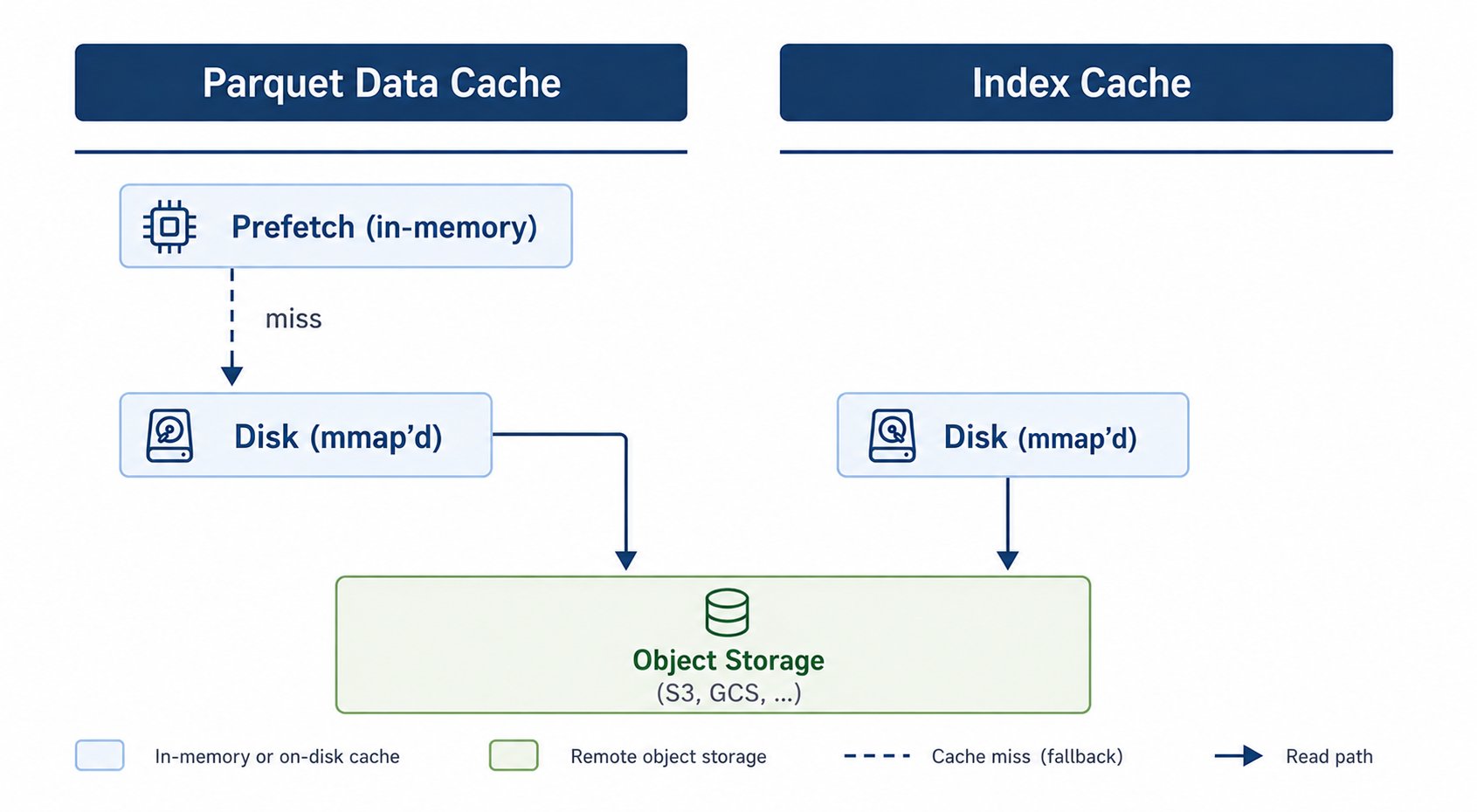
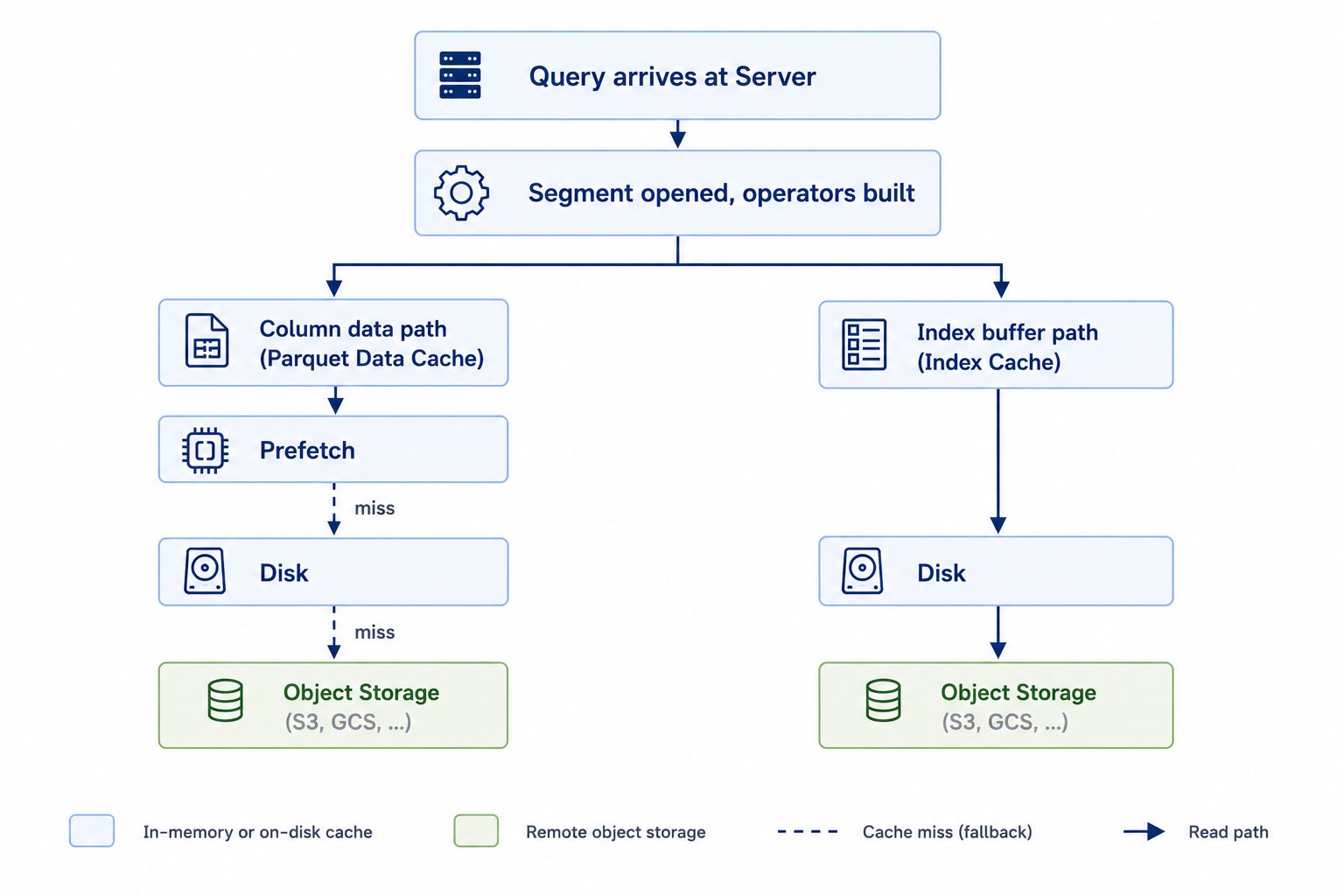
This document describes how Parquet data cache and Pinot index cache work in case of External tables as well as regular tables configured with remote tiered storage. External tables read their data from object storage on every query. The Parquet Data Cache keeps recently-read Parquet pages on the server so subsequent queries do not pay the round-trip. Indexes for both external tables and Pinot tiered storage tables also live on object storage. The Index Cache keeps recently-read index byte ranges on the server.
Both caches share the same underlying machinery and, by default, the same in-memory sizing configuration (it isn’t scoped per cache):
- Parquet Data Cache populates an in-memory prefetch tier (decompressed, decoded values on heap, default 1 GB) in front of an mmap-backed disk tier (default 15% of disk per dictionary/data pool).
- Index Cache populates an in-memory raw-bytes tier (the same underlying memory cache used by the Parquet Data Cache — default 256 MB data / 64 MB dictionary, since the memory-size configs aren’t per-consumer) in front of its own mmap-backed disk tier. Only the 1 GB prefetch tier is effectively Parquet-Data-Cache-only, since raw index byte ranges have no decoded form to keep there.
2. What’s enabled out of the box
2.1 Parquet Data Cache — always on
This cache is always on and does not need to be explicitly enabled. The cache is created at server startup and serves every read against a remote-Parquet column.2.2 Index Cache — opt-in per query
The Index Cache is populated only when a query is preceded by
Without the query option and without StarTree bitmap reads, the Index Cache stays empty and the directory remains untouched.
3. Advanced operations: Enable, disable, skip
3.1 Parquet Data Cache
Always on at the server level and cannot be globally disabled. However, you can use a per-query bypass as shown below:3.2 Index Cache
In this case, there is no global enable flag; enablement is a per-query decision. You can enable index cache for a specified query as shown below:
As mentioned previously, once set, subsequent queries can benefit from this index cache as applicable.
3.3 Footer Cache
The Footer Cache stores the Parquet file footer (row-group metadata and schema) for each segment so it doesn’t need to be re-fetched from object storage on every query. It follows the persistent disk cache’s global switch — on by default, no separate directory to configure:parquet_page_index.bin) under <root>/tieredStorage/segmentCache and always reloaded on server restart. A legacy standalone parquet_footer.bin from an older build is migrated into the page index and then removed. Setting enabled = false disables the footer cache along with every other managed disk cache, and the footer is then fetched from remote storage on each query.
For the full list of persistent disk cache configuration keys, see Best Practices and Configs.
4. Behavior on restart
Restart reuse is on by default (changed in 0.16.x — it used to be opt-in). The disk tier reloads its key index from a snapshot file written during shutdown (and periodically every five minutes) and resumes serving immediately, for both caches identically:false to start the disk tier empty on every restart instead.
The prefetch tier is in-memory — it always starts empty and is not persisted across restarts.
5. Eviction policies
When the disk tier is full, the oldest fragment file is unmapped and deleted; new pages are written to a fresh fragment.
TTL-based eviction was removed in 0.16.x. The disk tier now evicts purely on capacity (LRU) and segment-version invalidation; there is no idle- or write-age TTL to configure, and the old
ttl.access.ms / ttl.write.ms / eviction.interval.ms keys are ignored (the sweep interval is a fixed 60s). Entries restored from a restart snapshot are still safe to reuse — the source/version keying described in Best Practices and Configs prevents a stale entry from being served after a same-URI replacement.Disk cache configuration reference
The Parquet Data Cache and Index Cache disk tiers are two consumers of the shared persistent disk cache,pinot.server.instance.disk.cache.*. Sizing keys accept a .PARQUET_INDEX or .SEGMENT_INDEX suffix to target one consumer independently.
Percentage sizes round down to whole fragments and are capped at 320000 MiB per Parquet-page pool or 5120000 MiB per segment-index pool; set an explicit byte/unit size instead of a percentage to exceed that ceiling.
See Persistent disk cache for the global
enabled/directory switches shared with every other managed cache.
6. Clearing caches
HTTP endpoints
There are certain scenarios in which user may want to clear the caches. StarTree provides Cluster-wide APIs for this (controller fans out to every server):
This can also be done via a per-server API (skip the controller, hit one server directly):