

validDocIds bitmap; the old row stays on disk, but queries skip it. This metadata grows with the table.
Open-source Pinot keeps upsert metadata on the JVM heap. That’s fine at small scale, but grows expensive as primary-key volume grows — it eats heap, slows ingestion and queries, and vanishes on restart (forcing a full segment scan to rebuild).
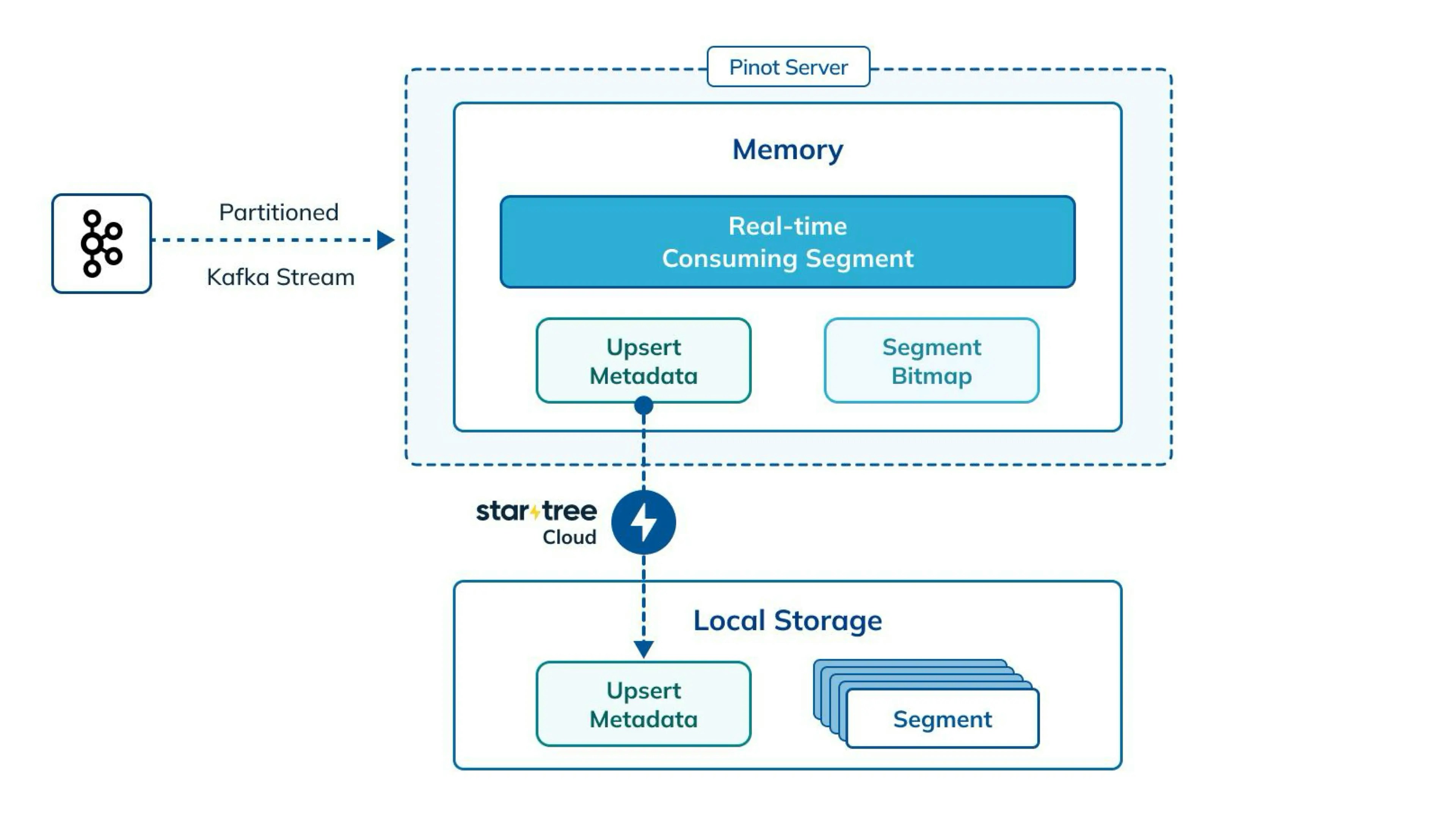
StarTree’s off-heap upserts move that metadata onto a disk-backed RocksDB store shared across all upsert tables on the server. Scales with disk instead of heap, and prebuilt metadata lets servers hydrate on startup instead of rebuilding from segments.
Merge JSON fields during partial upsert
Starting with the StarTree Cloud 0.17.0 release, MERGE_JSON will let you update selected JSON attributes while retaining omitted attributes. It supports recursiveappend (default)
and nested-object override modes on realtime partial-upsert tables. Confirm availability in your environment before enabling it.
The guide covers the custom merger configuration and how it works alongside existing off-heap metadata settings.
OFFLINE Upserts
StarTree also supports upserts on OFFLINE tables, currently in beta while testing continues. OFFLINE upsert shares the same off-heap RocksDB metadata store described below. The rest of this page describes real-time upserts unless noted otherwise. Minion tasks are not supported in the latest release yet — planned for upcoming iterations. This includes OSS tasks (MergeRollup, UpsertPurgeTask), SegmentRefreshTask (SRT v1 and v2), StarTreeAlterTableTask, and UpsertCompactionTask / UpsertCompactMergeTask. Available today: Only FULL upsert mode is supported — PARTIAL upsert does not work with OFFLINE upsert tables. Fast metadata recovery via UpsertSnapshotCreationTask is a work in progress.Configs
Nothing to configure to get started. Off-heap upsert, snapshot, and preload are on by default for real-time tables, and both FULL and PARTIAL upsert modes work out of the box — no configs beyond the standard Apache Pinot upsert configs are required. The settings below are optional knobs for tuning or overriding defaults.Adding, removing, or changing
upsertConfig requires a server restart — the metadata manager is built once at server startup.- Server / cluster configs — where to store upsert metadata on disk, RocksDB store initialization.
- RocksDB tuning configs — write buffer, block cache, row cache, etc. Names mirror RocksDB’s own; defaults work well for most workloads.
ColumnFamily in the shared store. To tune it, add RocksDB configs under metadataManagerConfigs — the config names match RocksDB’s own.
Disable off-heap upsert for an entire environment
To turn off the RocksDB-backed upsert manager server-wide and fall back to the open-source on-heap implementation, set the following server config and restart (it’s read once at server startup, and defaults totrue):
upsertConfig keeps using it regardless — remove it too for that table to fall back to the on-heap manager:
Enable async removal of upsert metadata
When a table has a lot of primary keys, its upsert metadata in RocksDB can be huge, and cleaning it up can take a long time. This async removal feature moves that cleanup onto a dedicated background thread pool, instead of blocking the thread doing the actual ingestion or segment-load work. This only removes primary-key entries from the RocksDB metadata store, invalidating those keys for future upsert resolution — it does not delete or compact the underlying segment data itself. Reclaiming that storage still requires Segment Refresh Task. This feature is enabled by default, and there’s no need to specify the configs unless you want to modify the default configurations.upsertConfig field, this is read once when a table’s upsert metadata manager is built — a server restart is required for changes to these configs to take effect.
Accelerating Server Restarts
When a server restarts, it needs to recover the upsert metadata (primary key → record location) for every partition it hosts before it can resume real-time ingestion and serve correct query results. Off-heap upserts try to avoid the most expensive path — rebuilding metadata by scanning every segment — using a priority-ordered set of recovery paths:- Reuse the local RocksDB state left behind by the previous server process, if it is still on disk and still valid for the current table/segment configuration. This is the fastest path since no metadata is recomputed at all.
- If local state can’t be reused or is corrupted, import a prebuilt snapshot produced by the
UpsertSnapshotCreationTaskminion task from the deep store. This is fast and also works when the server has lost its local disk entirely (e.g. after a node replacement). - If neither is available, fall back to a full rebuild — reading local
validDocIdssnapshots (or, absent those, scanning raw segments) to reconstruct metadata from scratch. This is the slowest path and is the same mechanism the open-source on-heap implementation always uses.
Reuse Mode
On a graceful server shutdown, the RocksDB column family backing a partition’s upsert metadata is flushed to disk (rather than deleted) and a completion marker is written. On the next restart, if the server determines that this on-disk state is still valid, it reuses it directly instead of rebuilding metadata — this is what we refer to as reuse mode (StarTree’s engineering blog calls the same mechanism “Smart Metadata Persistence”). Reuse mode is enabled by default and applies to REALTIME upsert tables in FULL mode only. It is not compatible with PARTIAL upsert,dropOutOfOrderRecord / outOfOrderRecordColumn, or pauseless consumption — these always fall back to snapshot or full rebuild.
See Accelerating Pinot Server Restarts for Upserts at Scale for a deeper explanation.
Disabling Reuse Mode
Reuse mode is on by default. To disable it cluster-wide, set the following server flag (dynamically updatable at runtime, no restart required, defaults totrue):
Use UpsertSnapshotCreationTask
Reuse mode can’t be used when the server’s local disk is lost, when a crash leaves the on-disk snapshot stale, or when a rebalance moves partitions to a new server. In those cases, StarTree automatically falls back toUpsertSnapshotCreationTask.
UpsertSnapshotCreationTask addresses both problems. This minion task prebuilds a RocksDB-backed snapshot of the primary-key → record-location state for each table partition (incrementally updating the previous version where possible instead of always starting from scratch) and uploads it to the table’s deep-store snapshot directory. Servers simply download and import this prebuilt snapshot when loading upsert tables.
This task runs automatically for every real-time upsert table in StarTree — no opt-in needed. If a table doesn’t have an explicit UpsertSnapshotCreationTask entry under task.taskTypeConfigsMap, the controller schedules it on a default cron of 0 0 0/12 * * ? (every 12 hours).
All fallbacks and the restart flow are handled automatically in the background — no explicit configuration is required. If reuse mode can’t be applied, the server transparently falls back to importing a minion-built snapshot, or a full rebuild.
To change this default cadence cluster-wide instead of per table, set the following controller config:
0 0 0/12 * * ? (every 12 hours) if unset.
To customize the default schedule on a table:
schedule:
Metadata TTL and deletedKeys TTL
ThemetadataTTL and deletedKeysTTL configs, as described in the Pinot docs, work with off-heap upserts too. metadataTTL ages out primary keys older than the TTL window. This cleanup only purges entries out of the RocksDB upsert-metadata store — it does not delete or compact the underlying segment data itself. Cleanup is performed by the async removal feature described above, so it doesn’t block the start of new consuming segments, and the UpsertSnapshotCreationTask minion task is also TTL-aware, so stale metadata past the TTL is excluded from newly-built snapshots.
A few things to know specifically about metadataTTL:
metadataTTLdoesn’t work with SRT.
deletedKeysTTL:
-
Used together with
deleteRecordColumn, it purges tombstoned/deleted keys from the RocksDB upsert-metadata store after the TTL window — this doesn’t delete or compact the underlying segment data itself, so use Segment Refresh Task to actually reclaim segment storage for rows that TTL has aged out. -
deletedKeysTTLis in testing phase. -
For
deletedKeysTTLto work reliably, setpreload.enforce_prebuilt_snapshotinmetadataManagerConfigsto enforce an incremental snapshot build:preload.enforce_prebuilt_snapshotis not the same config asrocksdb.preload.use_prebuilt_snapshot. The latter is enabled by default and controls whether preload uses the minion-built snapshot to preload metadata during startup. -
Keep
UpsertSnapshotCreationTaskrunning regularly — cleanup is gated behind a fresh snapshot watermark, and simply stays disabled without one rather than risking key revival.
Segment Refresh Task (SRT)
Off-heap upserts on their own don’t reclaim space for records that have been overwritten or deleted — segments still contain the old, now-invalid rows until something physically removes them. StarTree’s Segment Refresh Task (SRT) is the recommended minion task for this: it compacts out invalid rows and merges small segments together in a single pass, replacing segments atomically so queries never see a partial swap. See the full Segment Refresh Task documentation for configuration details, and the SRT best practices for scheduling and sizing guidance.Recommended Minion Tasks
StarTree recommends the following minion tasks for upsert tables — using them together is what keeps storage and query costs down and query performance up, without sacrificing correctness:- Segment Refresh Task for compaction and merging of overwritten/deleted rows, in a single atomic pass.
UpsertSnapshotCreationTask, enabled and scheduled by default, for fast restart recovery. It’s good practice to have it run between SRT passes, so restarts and rebalances always import a snapshot that already reflects SRT’s latest compaction.SegmentPurgeTaskfor explicit, predicate-driven deletion of specific rows (for example a right-to-be-forgotten request) — a different problem from TTL-based cleanup.metadataTTL/deletedKeysTTLalready invalidate aged-out keys automatically (see Metadata TTL and deletedKeys TTL); it’s SRT, not a separate TTL-specific task, that physically compacts those invalidated rows out of segments.- File Ingestion Task is supported for FULL upsert tables only — it does not work with PARTIAL upsert tables. Running it on a table that also runs SRT is not recommended — see SRT with File Ingestion Task in Best Practices.
enableCommitTimeCompactioncompacts a segment only once at commit time and does not guarantee correctness across replicas, whereas SRT re-evaluates and compacts on every run.UpsertCompactionTaskcompacts one segment at a time and never merges, so it tends to leave behind many small segments — hurting query performance and, at scale, ingestion rate. Correctness may also not be guaranteed when it’s enabled together withdeleteRecordColumnor TTL-based configs (metadataTTL/deletedKeysTTL).UpsertCompactMergeTaskdoes merge segments, but only schedules one eligible merge group per partition per cycle, which doesn’t scale to tables with many partitions or frequent compaction needs.
Guardrails
Segment Operation Throttling
Concurrent segment loads and updates can trigger expensive RocksDB operations. Throttling caps how many segments can run these operations in parallel:These configs are dynamically updatable at runtime — no server restart is required for changes to take effect.
-
The before-serving-queries throttle threshold, defaults to
max(1, number of CPU cores / 4): -
The after-serving-queries throttle threshold, defaults to
max(1, number of CPU cores / 4):
Restricting Primary Keys per Server
When the number of primary keys per server gets too large, this can result in various issues:- RocksDB latency increase on query and ingestion path
- Server restarts and rebalance scenarios can become slow even when snapshots exist
A controller restart is required for this config change to take effect.
Consuming Segment Consistency Mode
Upsert metadata can briefly diverge across replicas — a lagging replica can return a stale record. This is generally safe for FULL upsert, but unsafe for PARTIAL upsert and for FULL tables usingdropOutOfOrderRecord/outOfOrderRecordColumn, since both depend on an accurate record-location pointer.
Control with pinot.server.consuming.segment.consistency.mode (no restart needed):
RESTRICTED(default) — blocks force-commit/reload during the risky transition.PROTECTED— allows it, then reconciles afterward (resets each affected key’s pointer on consuming-segment removal).UNSAFE— no reconciliation; not recommended for production.
dropOutOfOrderRecord/outOfOrderRecordColumn), force-commit, pause-consumption, and reload are blocked under RESTRICTED — without reconciliation, these operations can leave upsert metadata pointing at the wrong record. Switch to PROTECTED to allow them safely.
See the Apache Pinot docs on handling inconsistencies for the metrics that surface inconsistent rows.
Minion Task Segment Selection Consensus
Minion tasks that rewrite or merge segments —UpsertCompactionTask, UpsertCompactMergeTask, Segment Refresh Task, and StarTreeAlterTableTask — share the same safeguard:
- Every replica hosting the segment is queried for its
validDocIdsmetadata. - All responding replicas must report the same valid-doc count and a CRC matching ZooKeeper’s segment metadata.
- If replicas disagree, or too few respond, the segment is skipped rather than rewritten on stale state.
Table Config Immutability
We restrict changes to certainupsertConfig fields once a table is created, because changing them can silently break upsert correctness for data ingested before the change. Disallowed from changing — see the OSS docs on Immutable upsert configuration fields:
- The schema’s
primaryKeyColumns modehashFunctioncomparisonColumns(andtimeColumnNamewhen used as the implicit comparison column)deleteRecordColumndropOutOfOrderRecordoutOfOrderRecordColumn
force=true bypasses the check, but should be reserved as a last resort: pause ingestion and restart servers first, since using it without doing so can corrupt upsert correctness for data ingested before the change. The recommended way to change one of these is to create a new table with the desired configuration and reingest.
By contrast, enableSnapshot, enablePreload, metadataTTL, deletedKeysTTL, and the partial-upsert merge strategy/merger class are explicitly safe to change on an existing table at any time — though all of them are read once when a table’s upsert metadata manager is built, so a server restart is needed before any of these new values actually take effect.
For the safest rollout when changing any of these, see Safest rollout for mutable upsert config changes in Best Practices.
Record Comparison and Tie Breakers
The comparison value comes from the comparison columns you configured for the table, or fromtimeColumnName when none is set. This holds for OFFLINE tables too, where segment push time only breaks ties (see Which timestamp is used). When two records share a primary key, the one with the greater value is current. With full upsert, the winning record replaces the current one whole. With partial upsert, StarTree merges a winning streaming record into the current one using the column strategies you configured.
Equal values happen even when every update carries its own value. The stream can deliver one event twice, and a commit, reload, refresh, or upload can leave copies of one record in two segments. The walk below decides those cases.
Which record wins
StarTree asks these questions in order and stops at the first one that separates the two records.- Is one comparison value greater? That record wins.
- Did the record just arrive from the stream? The new record wins.
- Are both records in the same segment? The record with the higher document ID wins. Document IDs follow stored order, which can differ from arrival order when the segment is sorted.
- Is the segment that holds the current record being replaced, for example on commit or reload? The record in the replacement segment wins.
- Is either segment a refreshed segment? This step exists only with off-heap upsert. Three checks run in order:
- The segment with the higher sequence number wins. A segment with a sequence number beats one without.
- At the same sequence number, the refreshed segment beats the unrefreshed one. This is how a refreshed segment takes over from the segments it was built from.
- If both are refreshed, the segment with the later timestamp wins.
- Are both segments LLC segments? The segment with the higher sequence number wins.
- Otherwise, the segment with the later timestamp wins.
- Still tied? The current record stays. Two rare exceptions are listed under edge cases.
How to recognize a segment from its name
Steps 5 and 6 depend on the segment type, and the name tells you which type you have. The examples use tableorders, partition 3.
- LLC segment, built by the server from the stream:
orders__3__12__20260915T0930Z. The third field, 12, is the sequence number. - Refreshed segment, written by Segment Refresh Task:
refreshed__orders__3__20260915T0930Z__12. It starts withrefreshed__, and the last field is the highest sequence number among the segments it was built from. - Uploaded segment, pushed by a job or a backfill:
uploaded__orders__3__20260915T0930Z__1. The first field is a prefix the uploader chooses. It has no sequence number, so it can only win a tie on timestamp.
Which timestamp is used
The timestamp is the one recorded in ZooKeeper, so every replica reads the same value and picks the same winner. REALTIME tables use the segment creation time. OFFLINE tables use the segment push time, and fall back to the creation time when the push time is missing.Three cases you will meet
The same event arrived twice from Kafka. Both copies have the same key and value. Step 2 makes the second copy current. With full upsert nothing visible changes, because the two records are identical. With partial upsert the merge runs again on the second copy, so a strategy that is not safe to repeat, such asINCREMENT, changes the stored value. Equal comparison values do not deduplicate replays.
A backfill segment was uploaded for a key the stream also carries, with the same comparison value. One segment is LLC and one is uploaded, so steps 5 and 6 do not apply. Step 7 picks the segment with the later ZooKeeper creation time. If you need the backfill to win, give it a greater comparison value instead of relying on upload timing.
Segment Refresh Task rewrote a segment and both copies are loaded during the swap. The source is orders__3__12__… and the output is refreshed__orders__3__…__12. Step 5 sees the same sequence number on both and picks the refreshed one.
Edge cases
- If no ZooKeeper timestamp is set, StarTree uses the index creation time stored inside the segment.
- At step 8, when the timestamps are equal and neither segment is refreshed, StarTree prefers the segment named in the standard uploaded-realtime format. If both segments use that format, or neither does, the current record stays.
Diagnosing Duplicates and Count Mismatches
If the surprise is which of two records with the same primary key won, start with Record Comparison and Tie Breakers. The techniques below are for counts that are off. If a query is returning more rows than expected for a primary key, or the table’s total count is running ahead of the source system, these are the techniques StarTree engineers use to narrow down where the divergence is coming from:-
Compare against the raw, un-deduplicated rows.
SELECT ... FROM myTable OPTION(skipUpsert=true)bypasses upsert masking entirely and returns every physically stored row, including ones the upsert layer considers superseded. A large gap between this count and the normal count is expected and healthy; if the two counts are close, masking itself has failed for some rows. -
Trace a duplicate back to its segment, doc, and host. Project the virtual columns
$segmentName,$docId, and$hostNamealongside the primary key to pinpoint exactly which segment, docId, and server a duplicate is coming from. If a duplicate for the same PK is served from a segment that should have been superseded, look at partitioning (see Avoiding duplicates below) or a stale local RocksDB state on that host. -
Detect cross-replica upsert-metadata divergence. Run the same query with
OPTION(useStrictReplicaGroup=true)and without it, and compare counts. A difference means replicas disagree on which record is currently valid for some PKs — for example due to a bad reuse-mode checkpoint, or a consuming-segment-commit race (see Consuming Segment Consistency Mode). -
Recover from a snapshot that has baked in bad state. A snapshot (from reuse mode or
UpsertSnapshotCreationTask) can capture bad state — a plain reload or restart just re-trusts it, so nothing changes. To actually fix it:- Pause ingestion for the table.
-
Reload the affected segments with
forceDownload=trueto rebuild metadata from a fresh segment scan instead of the snapshot. -
If you need to restart instead, also disable reuse mode first — otherwise the restart just re-trusts the same bad state:
-
Check whether
metadataTTLevicted the key before a late update arrived.metadataTTLassumes no more updates will come in for a primary key once its metadata is removed from RocksDB — if an update does arrive after that point, it’s no longer recognized as an update at all, and lands as a brand-new record alongside the existing row instead of replacing it. If the duplicated PK’s original ingestion time is older than yourmetadataTTLwindow, this is likely the cause.
Best Practices
- Always set a comparison column. Neither
comparisonColumnsnortimeColumnNameis actually required by validation — if you set neither, Pinot silently falls back to ordering by segment creation time, which has nothing to do with the actual event order in your data. Always configure a real comparison column so “latest wins” is deterministic and reflects your source data, not arrival order. - Ingestion transform functions: Do not use a non-deterministic transform function (for example
now(),ago(), oragoMV()) on the primary key, comparison column(s), or partition column — each server evaluates transforms independently per replica, so a non-deterministic function can produce a different value per replica for the same source record and diverge query results across replicas. Not validated or blocked today. This includes the case wheretimeColumnNameis implicitly used as the comparison column: Pinot doesn’t distinguish a genuine event-time column from one populated by an ingestion-time transform, so an ingestion-timetimeColumnNamedegrades to the same non-determinism as usingnow()directly. - Partitioning: Size the partition count so that each server-hosted partition’s primary-key volume stays well within what a single RocksDB column family handles comfortably (typically well under a billion keys — see Restricting Primary Keys per Server), and avoid so many partitions per server that RocksDB compaction/flush overhead starts to dominate. Treat the partition count as immutable once set: Pinot’s backward-compatibility validation doesn’t check partition-count changes today, and changing it re-maps primary keys to different partitions than their historical records live in, which can produce duplicate or incorrect upsert resolution.
- Avoiding duplicates: Make sure upstream partitioning is set up correctly so the same primary key always lands in the same partition. Upsert metadata is scoped per partition at the server level, so a key split across two partitions is never reconciled by either partition’s metadata manager, and both copies can end up visible as duplicates. This isn’t detected or validated at ingestion time today.
- Comparison column type: Use
INT,LONG,FLOAT,DOUBLE,BIG_DECIMAL, orSTRING.BYTEScomparison columns are not supported by the RocksDB-backed upsert manager, even though the on-heap implementation supports anyComparabletype. - Rebalance: Before rebalancing an off-heap upsert table, make sure
UpsertSnapshotCreationTaskis enabled and every partition has a current upsert snapshot — the rebalance precheck flags an error if snapshots are missing, stale, or the task isn’t enabled; no equivalent precheck exists for on-heap tables today. - Deleted-keys cleanup: Configure
deletedKeysTTLtogether withdeleteRecordColumn, and keep snapshots enabled — TTL cleanup without a minion snapshot watermark is disabled by default, so it depends onUpsertSnapshotCreationTaskrunning regularly. - Only enable
metadataTTLif you’re sure no key will get a legitimate update after the TTL window.metadataTTLmust be larger than the longest gap you realistically expect between two updates to the same primary key — not just “how long you want to keep the data.” Once a key’s metadata is evicted from RocksDB, a later update for that key is no longer recognized as an update at all: it lands as a brand-new record next to the existing, no-longer-invalidated row, instead of replacing it. This is the single most common cause of duplicate/count-mismatch issues in practice. - TTL and
validDocIdsType: Be careful whenmetadataTTL/deletedKeysTTLis set. Minion tasks that readvalidDocIdsbitmaps (including the minion task consensus check) support avalidDocIdsTypeofSNAPSHOT(the default) orIN_MEMORY—IN_MEMORYis documented upstream as inconsistency-prone during concurrent restarts, which is more likely while TTL cleanup is actively running. Prefer leavingvalidDocIdsTypeat itsSNAPSHOTdefault for correctness and consistent results. - SRT with File Ingestion Task: Running the two together is not recommended, since FIT segments may not follow LLC naming, which can lead to resolution conflicts with SRT’s refreshed segments. FIT also does not support PARTIAL upsert tables — only FULL.
- Rolling upgrades: Upgrade servers before minions when adopting a new StarTree release with upsert snapshot changes.
- Safest rollout for mutable upsert config changes: When changing
enableSnapshot,enablePreload,metadataTTL,deletedKeysTTL, or the partial-upsert merge strategy — pause ingestion, disable reuse mode, triggerUpsertSnapshotCreationTaskto build a fresh snapshot under the new config, then restart the servers, and resume ingestion once they’re back up. Disabling reuse mode is required — none of these config changes invalidate the on-disk reuse checkpoint automatically, so a restart would otherwise reuse the old state. Re-enable reuse mode once servers are back up.