> ## Documentation Index
> Fetch the complete documentation index at: https://docs.startree.ai/llms.txt
> Use this file to discover all available pages before exploring further.
# Using Role-Based Access Control with ThirdEye
In this recipe, we'll create access control policies in Startree ThirdEye. Here we restrict access by region, however access control policies can be used to restrict access of any data dimension to any set of Okta groups or other user attributes. For a more in-depth explanation of how access control and authorization works in ThirdEye, see [Access Control in Thirdeye](/thirdeye/access-control-in-thirdeye).
We'll create an alert with regional data in the US and Canada, and restrict access to the alert data to 3 categories of users:
* Regional analysts
* Assigned to Okta group `regional_analysts_us` or `regional_analysts_ca`.
* View alerts for their region.
* Manage anomalies and investigations for their region.
* Global Viewers
* Assigned to Okta group `global_viewers`.
* View alerts, anomalies, and investigations for any region.
* Admins/makers:
* Assigned to Okta group `thirdeye_admin`.
* Create alerts for any region.
* Manage authorization policies.
## Recipe outline
1. Handle prerequisites and setup
2. Create the namespaces we'll use to group our ThirdEye resources
3. Restrict access to ThirdEye resources with access control policies
4. Create an alert with separate timeseries for US and Canada data using dimension exploration
## Prerequisites
1. [Obtain your StarTree cloud bearer token](/thirdeye/how-tos/use-the-api).
2. Log into the Authorization server's UI. If your ThirdEye is at [https://thirdeye.my-env.my-org.startree.cloud](https://thirdeye.my-env.my-org.startree.cloud), then the authorization server ui is at [https://my-env.my-org.startree.cloud/auth/swagger-ui/index.html](https://my-env.my-org.startree.cloud/auth/swagger-ui/index.html).
The alert will use data from the [pageviews demo dataset](https://github.com/startreedata/thirdeye/tree/master/examples/pageviews) and [dimension exploration](/thirdeye/dimension-exploration) to segment the data into different regions.
## Namespaces
First, we'll create a set of namespaces to group our ThirdEye alerts, anomalies and other resources. The access control policies will apply to these namespaces instead of individual resources. Namespaces are string values that must match regex `^[a-z0-9-_]+$`.
We set the namespace of alerts and its enumeration items in the alert configuration. Anomalies and investigations are automatically assigned to the namespace of the alert or enumeration item it is assigned to. Resources that do not have a configured namespace are placed in the `default` namespace.
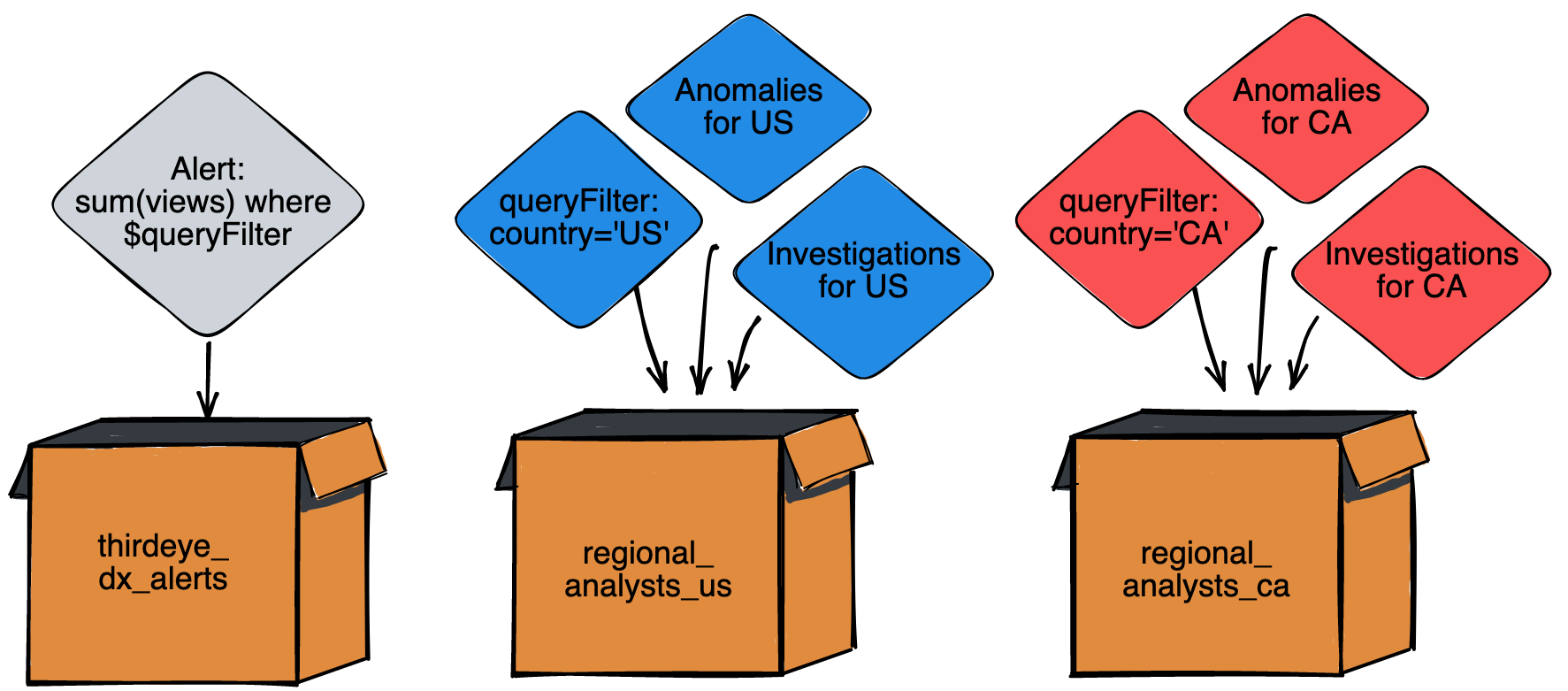
In this recipe, we'll create 3 namespaces:
* `thirdeye_dx_alerts` - This will contain the dimension exploration alerts.
* `regional_analysts_us` - This will contain the US dimension and all related investigations and anomalies.
* `regional_analysts_ca` - This will contain the CA dimension and all related investigations and anomalies.
All other ThirdEye resources like alert templates, datasets, and data sources will go into the `default` namespace.
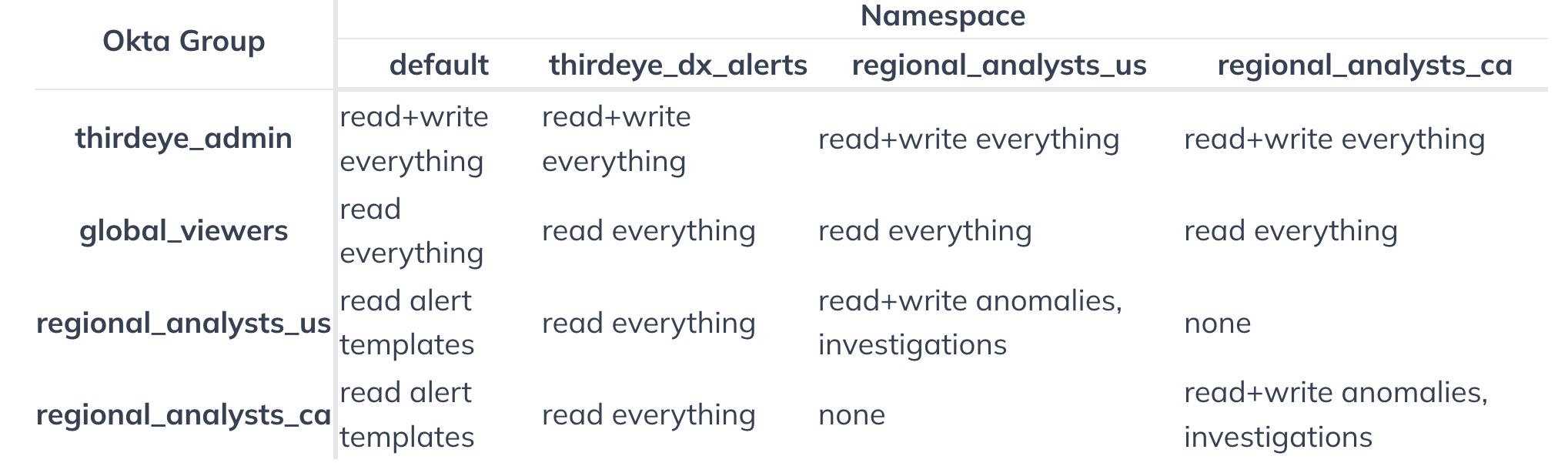
 The individual namespace permissions are broken down in this table:
 ### Create the namespaces
Here are the JSON payloads needed to create the namespaces. To enable each, copy and paste the code directly into the Swagger UI's `create namespace` tool.
If you get a 403 Forbidden error, this means you do not have permission to create namespaces. Reach out to ThirdEye support for help.
#### thirdeye\_dx\_alerts
```json theme={null}
{
"name": "thirdeye_dx_alerts",
"description": "ThirdEye dimension exploration alerts.",
"enabled": true
}
```
#### regional\_analysts\_us
```json theme={null}
{
"name": "regional_analysts_us",
"description": "Anomalies and investigation for US.",
"enabled": true
}
```
#### regional\_analysts\_ca
```json theme={null}
{
"name": "regional_analysts_ca",
"description": "Anomalies and investigation for Canada.",
"enabled": true
}
```
## Policies
Next, let's create the policies. Like ThirdEye resources, policies are assigned to a namespace. A policy will only apply to resources in its namespace, except for one special case: Policies in the default namespace are applied to all resources.
### Create the policies
To enable each, copy and paste the code directly into the Swagger UI's `create policy` tool.
#### Grant read and write access to the admin group
This policy allows users in the thirdeye\_admin Okta group to read and write all entities. We assign the policy to the default namespace, so all entities are covered.
```json theme={null}
{
"policyType": "ALLOW",
"namespaceSrn": "srn:zone:namespace:default:default",
"priority": 1,
"rule": "subject_user_groups CONTAINS 'thirdeye_admin'",
"description": "Allow users in the thirdeye_admin Okta group to read and write all entities."
}
```
#### Grant read access to global viewers
This policy allows users in the global\_viewers Okta group to read all entities. Same as before, this policy goes in the default namespace to cover all entities.
```json theme={null}
{
"policyType": "ALLOW",
"namespaceSrn": "srn:zone:namespace:default:default",
"priority": 2,
"rule": "subject_user_groups CONTAINS 'global_viewers' AND action='read'",
"description": "Allow users in the global_viewers Okta group to read all entities."
}
```
#### Grant read access for all alert templates
This policy allows all users to read the alert templates. Since alert templates are used to render alerts, but cannot be used to view data by themselves, we can use a lenient read policy. This policy will cover the standard ThirdEye alert templates, which are in the default namespace.
```json theme={null}
{
"policyType": "ALLOW",
"namespaceSrn": "srn:zone:namespace:default:default",
"priority": 3,
"rule": "resource_srn_entity='thirdeye-alert_template' AND action='read'",
"description": "Allow all users to read ThirdEye alert templates."
}
```
#### Grant read access for the dimension exploration alerts
This policy allows all users to read the ThirdEye alerts in the `thirdeye_dx_alerts` namespace. When we create an alert, we must also assign it to the `thirdeye_dx_alerts` namespace so all users can see it.
```json theme={null}
{
"policyType": "ALLOW",
"namespaceSrn": "srn:zone:namespace:thirdeye_dx_alerts:default",
"priority": 4,
"rule": "action='read'",
"description": "Allow all users to read all entities in the thirdeye_dx_alerts namespace."
}
```
#### Grant read+write access to anomalies and investigations in the regional namespaces.
Finally, let's create policies to allow our regional analysts to read and write anomalies and investigations in their namespaces.
```json theme={null}
{
"policyType": "ALLOW",
"namespaceSrn": "srn:zone:namespace:regional_analysts_us:default",
"priority": 1010,
"rule": "subject_user_groups CONTAINS 'regional_analysts_us' AND (resource_srn_entity='thirdeye-anomaly' OR resource_srn_entity='thirdeye-rca_investigation')",
"description": "Allow users in the regional_analysts_us okta group to read and write anomalies and investigations in the regional_analysts_us namespace."
}
```
```json theme={null}
{
"policyType": "ALLOW",
"namespaceSrn": "srn:zone:namespace:regional_analysts_ca:default",
"priority": 1110,
"rule": "subject_user_groups CONTAINS 'regional_analysts_ca' AND (resource_srn_entity='thirdeye-anomaly' OR resource_srn_entity='thirdeye-rca_investigation')"
"description": "Allow users in the regional_analysts_ca okta group to read and write anomalies and investigations in the regional_analysts_ca namespace."
}
```
#### (Optional) Grant read access to all entities in the regional namespaces
We may want to create alerts without dimension exploration, but still have the anomalies and investigations stay in a regional namespace. For this use-case, we create the alert in the regional namespace instead of the `thirdeye-dx-alerts` namespace. We'll then add a policy to allow our regional analysts read access to all entities in their namespace.
```json theme={null}
{
"policyType": "ALLOW",
"namespaceSrn": "srn:zone:namespace:regional_analysts_ca:default",
"priority": 1100,
"rule": "subject_user_groups CONTAINS 'regional_analysts_ca' AND action='read'",
"description": "Allow ca viewers read access to us resources."
}
```
```json theme={null}
{
"policyType": "ALLOW",
"namespaceSrn": "srn:zone:namespace:regional_analysts_us:default",
"priority": 1000,
"rule": "subject_user_groups CONTAINS 'regional_analysts_us' AND action='read'",
"description": "Allow us viewers read access to us resources."
}
```
## Create the Alert and Enumeration Items
Finally, it's time to create the alert. This alert uses the `startree-threshold-dx` template and the `pageviews` demo dataset. The alert has two enumeration items: one for data from the US and one for data from Canada. The alert itself is created in the `thirdeye_dx_alerts` namespace that anyone can read, and the enumeration items are created in their region-specific namespace.
Check that the `dataSource` and `dataset` template properties match the names for your instances.
Paste this alert body in ThirdEye's `Create Alert` JSON editor:
```json theme={null}
{
"name": "Views-Threshold-Dx-Recipe-Demo",
"auth": {
"namespace": "thirdeye_dx_alerts"
},
"template": {
"name": "startree-threshold-dx"
},
"cron": "0 0 5 ? * MON-FRI *",
"templateProperties": {
"dataSource": "pinot",
"dataset": "pageviews",
"aggregationFunction": "SUM",
"seasonalityPeriod": "P7D",
"lookback": "P90D",
"monitoringGranularity": "P1D",
"sensitivity": "3",
"aggregationColumn": "views",
"queryFilters": "${queryFilters}",
"max": "${max}",
"min": "${min}",
"enumerationItems": [
{
"name": "country='US'",
"params": {
"queryFilters": "AND country='US'",
"max": "900000",
"min": "120000"
},
"auth": {
"namespace": "regional_analysts_us"
}
},
{
"name": "country='CA'",
"params": {
"queryFilters": "AND country='CA'",
"max": "900000",
"min": "10000"
},
"auth": {
"namespace": "regional_analysts_ca"
}
}
]
}
}
```
### Results
With the access control policies in place, the alert will look different for the different user groups.
#### ThirdEye admins and global viewers
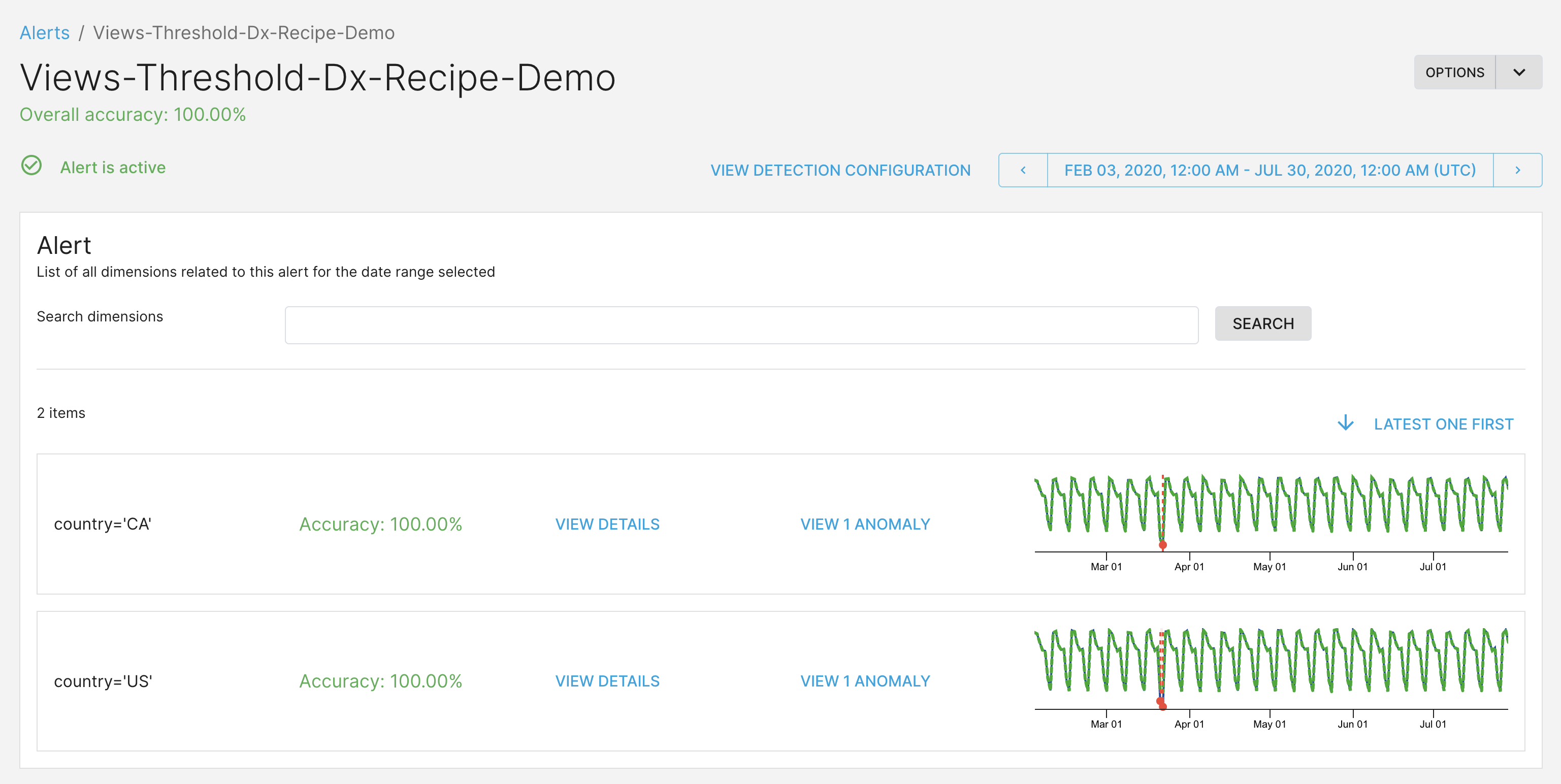
This is how the alert will look for the thirdeye admins and global viewers. We can see the timeseries and anomalies for both US and Canada.
### Create the namespaces
Here are the JSON payloads needed to create the namespaces. To enable each, copy and paste the code directly into the Swagger UI's `create namespace` tool.
If you get a 403 Forbidden error, this means you do not have permission to create namespaces. Reach out to ThirdEye support for help.
#### thirdeye\_dx\_alerts
```json theme={null}
{
"name": "thirdeye_dx_alerts",
"description": "ThirdEye dimension exploration alerts.",
"enabled": true
}
```
#### regional\_analysts\_us
```json theme={null}
{
"name": "regional_analysts_us",
"description": "Anomalies and investigation for US.",
"enabled": true
}
```
#### regional\_analysts\_ca
```json theme={null}
{
"name": "regional_analysts_ca",
"description": "Anomalies and investigation for Canada.",
"enabled": true
}
```
## Policies
Next, let's create the policies. Like ThirdEye resources, policies are assigned to a namespace. A policy will only apply to resources in its namespace, except for one special case: Policies in the default namespace are applied to all resources.
### Create the policies
To enable each, copy and paste the code directly into the Swagger UI's `create policy` tool.
#### Grant read and write access to the admin group
This policy allows users in the thirdeye\_admin Okta group to read and write all entities. We assign the policy to the default namespace, so all entities are covered.
```json theme={null}
{
"policyType": "ALLOW",
"namespaceSrn": "srn:zone:namespace:default:default",
"priority": 1,
"rule": "subject_user_groups CONTAINS 'thirdeye_admin'",
"description": "Allow users in the thirdeye_admin Okta group to read and write all entities."
}
```
#### Grant read access to global viewers
This policy allows users in the global\_viewers Okta group to read all entities. Same as before, this policy goes in the default namespace to cover all entities.
```json theme={null}
{
"policyType": "ALLOW",
"namespaceSrn": "srn:zone:namespace:default:default",
"priority": 2,
"rule": "subject_user_groups CONTAINS 'global_viewers' AND action='read'",
"description": "Allow users in the global_viewers Okta group to read all entities."
}
```
#### Grant read access for all alert templates
This policy allows all users to read the alert templates. Since alert templates are used to render alerts, but cannot be used to view data by themselves, we can use a lenient read policy. This policy will cover the standard ThirdEye alert templates, which are in the default namespace.
```json theme={null}
{
"policyType": "ALLOW",
"namespaceSrn": "srn:zone:namespace:default:default",
"priority": 3,
"rule": "resource_srn_entity='thirdeye-alert_template' AND action='read'",
"description": "Allow all users to read ThirdEye alert templates."
}
```
#### Grant read access for the dimension exploration alerts
This policy allows all users to read the ThirdEye alerts in the `thirdeye_dx_alerts` namespace. When we create an alert, we must also assign it to the `thirdeye_dx_alerts` namespace so all users can see it.
```json theme={null}
{
"policyType": "ALLOW",
"namespaceSrn": "srn:zone:namespace:thirdeye_dx_alerts:default",
"priority": 4,
"rule": "action='read'",
"description": "Allow all users to read all entities in the thirdeye_dx_alerts namespace."
}
```
#### Grant read+write access to anomalies and investigations in the regional namespaces.
Finally, let's create policies to allow our regional analysts to read and write anomalies and investigations in their namespaces.
```json theme={null}
{
"policyType": "ALLOW",
"namespaceSrn": "srn:zone:namespace:regional_analysts_us:default",
"priority": 1010,
"rule": "subject_user_groups CONTAINS 'regional_analysts_us' AND (resource_srn_entity='thirdeye-anomaly' OR resource_srn_entity='thirdeye-rca_investigation')",
"description": "Allow users in the regional_analysts_us okta group to read and write anomalies and investigations in the regional_analysts_us namespace."
}
```
```json theme={null}
{
"policyType": "ALLOW",
"namespaceSrn": "srn:zone:namespace:regional_analysts_ca:default",
"priority": 1110,
"rule": "subject_user_groups CONTAINS 'regional_analysts_ca' AND (resource_srn_entity='thirdeye-anomaly' OR resource_srn_entity='thirdeye-rca_investigation')"
"description": "Allow users in the regional_analysts_ca okta group to read and write anomalies and investigations in the regional_analysts_ca namespace."
}
```
#### (Optional) Grant read access to all entities in the regional namespaces
We may want to create alerts without dimension exploration, but still have the anomalies and investigations stay in a regional namespace. For this use-case, we create the alert in the regional namespace instead of the `thirdeye-dx-alerts` namespace. We'll then add a policy to allow our regional analysts read access to all entities in their namespace.
```json theme={null}
{
"policyType": "ALLOW",
"namespaceSrn": "srn:zone:namespace:regional_analysts_ca:default",
"priority": 1100,
"rule": "subject_user_groups CONTAINS 'regional_analysts_ca' AND action='read'",
"description": "Allow ca viewers read access to us resources."
}
```
```json theme={null}
{
"policyType": "ALLOW",
"namespaceSrn": "srn:zone:namespace:regional_analysts_us:default",
"priority": 1000,
"rule": "subject_user_groups CONTAINS 'regional_analysts_us' AND action='read'",
"description": "Allow us viewers read access to us resources."
}
```
## Create the Alert and Enumeration Items
Finally, it's time to create the alert. This alert uses the `startree-threshold-dx` template and the `pageviews` demo dataset. The alert has two enumeration items: one for data from the US and one for data from Canada. The alert itself is created in the `thirdeye_dx_alerts` namespace that anyone can read, and the enumeration items are created in their region-specific namespace.
Check that the `dataSource` and `dataset` template properties match the names for your instances.
Paste this alert body in ThirdEye's `Create Alert` JSON editor:
```json theme={null}
{
"name": "Views-Threshold-Dx-Recipe-Demo",
"auth": {
"namespace": "thirdeye_dx_alerts"
},
"template": {
"name": "startree-threshold-dx"
},
"cron": "0 0 5 ? * MON-FRI *",
"templateProperties": {
"dataSource": "pinot",
"dataset": "pageviews",
"aggregationFunction": "SUM",
"seasonalityPeriod": "P7D",
"lookback": "P90D",
"monitoringGranularity": "P1D",
"sensitivity": "3",
"aggregationColumn": "views",
"queryFilters": "${queryFilters}",
"max": "${max}",
"min": "${min}",
"enumerationItems": [
{
"name": "country='US'",
"params": {
"queryFilters": "AND country='US'",
"max": "900000",
"min": "120000"
},
"auth": {
"namespace": "regional_analysts_us"
}
},
{
"name": "country='CA'",
"params": {
"queryFilters": "AND country='CA'",
"max": "900000",
"min": "10000"
},
"auth": {
"namespace": "regional_analysts_ca"
}
}
]
}
}
```
### Results
With the access control policies in place, the alert will look different for the different user groups.
#### ThirdEye admins and global viewers
This is how the alert will look for the thirdeye admins and global viewers. We can see the timeseries and anomalies for both US and Canada.
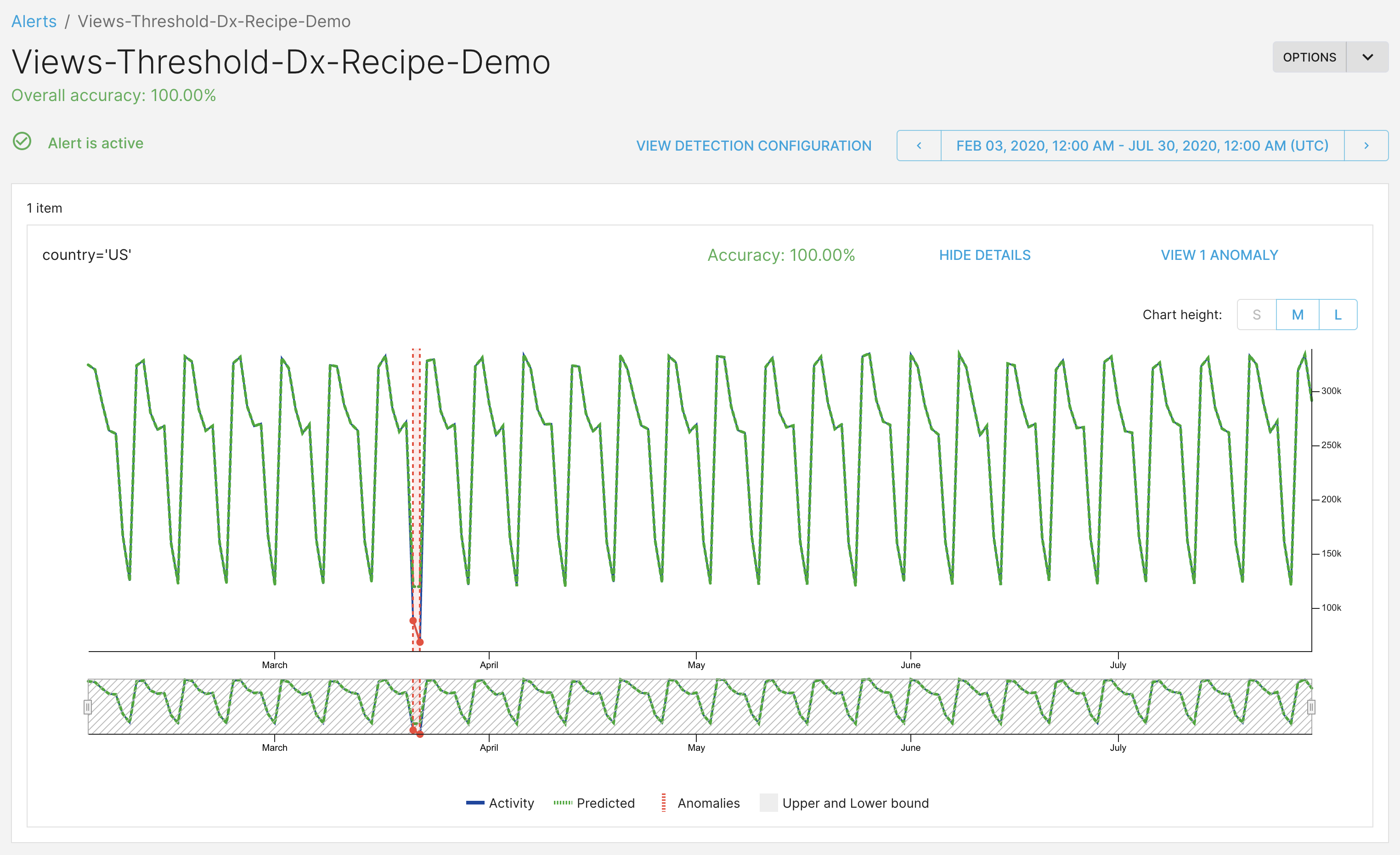
 #### Regional analysts for US
This is how the alert will look for the US analysts. Only the timeseries and anomalies for the US are visible.
#### Regional analysts for US
This is how the alert will look for the US analysts. Only the timeseries and anomalies for the US are visible.
 #### Regional analysts for Canada
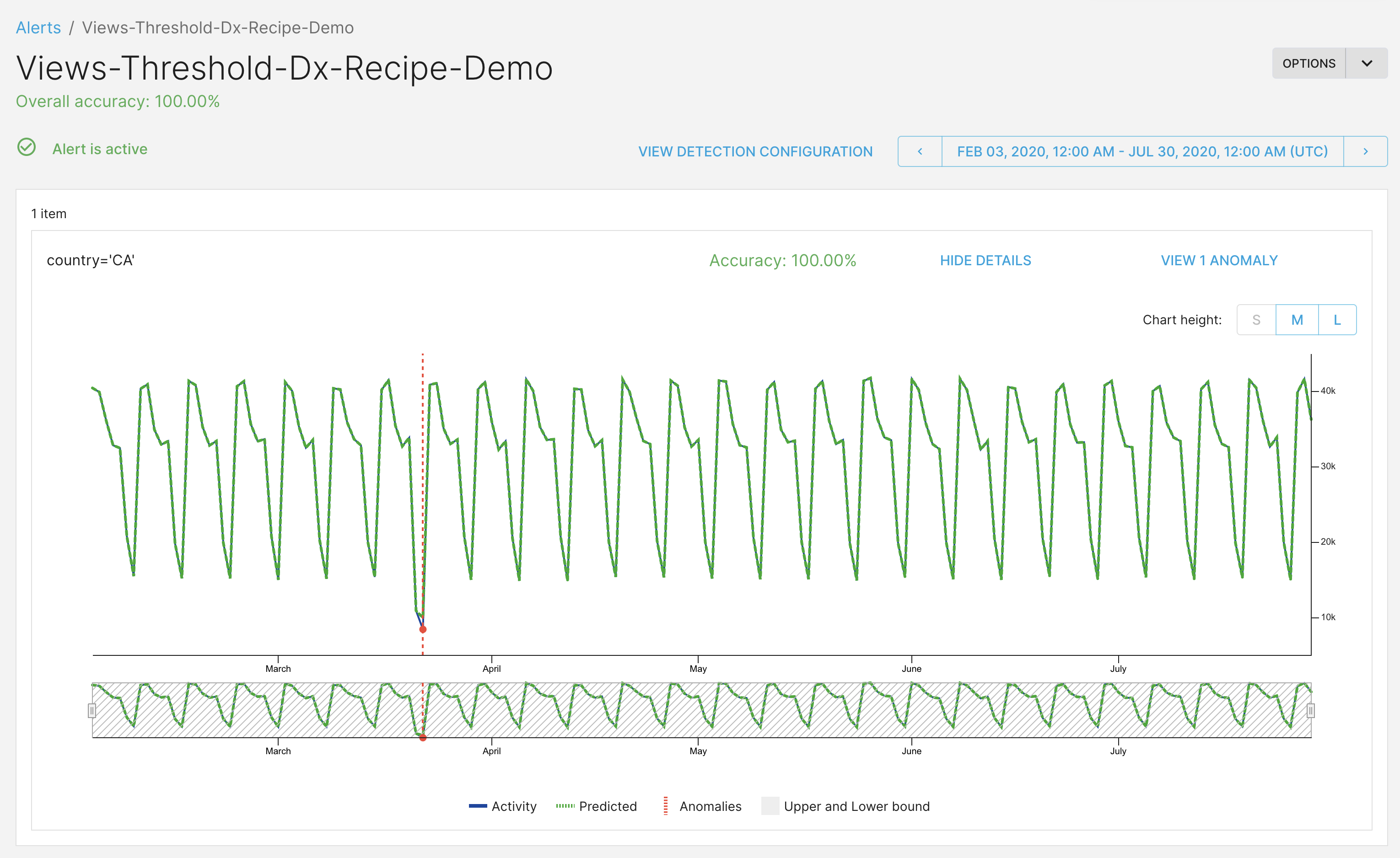
This is how the alert will look for the Canada analysts. Only the timeseries and anomalies for Canada are visible.
#### Regional analysts for Canada
This is how the alert will look for the Canada analysts. Only the timeseries and anomalies for Canada are visible.