> ## Documentation Index
> Fetch the complete documentation index at: https://docs.startree.ai/llms.txt
> Use this file to discover all available pages before exploring further.
# Ingest GitHub API Events using Kinesis
## Pull Request Merged Events Stream
In this recipe, we will do the following:
1. Set up a Localstack Kinesis cluster (Optional)
2. Install AWS CLI
3. To set up a Pinot cluster, do the following:
a. Start Zookeeper
b. Start controller
c. Start broker
d. Start server
4. Create a Kinesis stream with name **pullRequestMergedEvents**
5. Create a real-time table and schema for **pullRequestMergedEvents**
6. Start a task which reads from [GitHub events API](https://developer.github.com/v3/activity/events/) and publishes events about merged pull requests to the stream.
7. Query the real-time data
## Launch localstack Kinesis
This step is needed only when you don't want to use official Kinesis in AWS. It creates a mock Kinesis cluster via [Localstack](https://docs.localstack.cloud/get-started/).
```bash theme={null}
docker run \
--name pinot-kinesis \
-p 127.0.0.1:4566:4566 \
localstack/localstack:0.12.15
```
## Install AWS CLI
We need to interact with Kinesis throughout this recipe. For this purpose, we'll be using official AWS CLI to process the commands. The AWS CLI also works with localstack seamlessly.
You can follow the [official AWS documentation](https://docs.aws.amazon.com/cli/latest/userguide/getting-started-prereqs.html) to get started with CLI.
You need to ensure the credentials are properly configured for your AWS account.
In case of localstack cluster, the default credentials are as follows:
```text theme={null}
accessKey: access
secretKey: secret
```
## Setup Pinot Cluster and Kinesis Tables
There are multiple ways to set up the cluster. Here we'll consider only Docker and Launcher scripts. For Kubernetes and other set ups, you can check out our official documentation.
#### Pull docker image
Get the latest Docker image.
```
export PINOT_VERSION=latest
export PINOT_IMAGE=apachepinot/pinot:${PINOT_VERSION}
docker pull ${PINOT_IMAGE}
```
### With Quickstart Utility
You can use the following single-command utility to run all the previous steps.
Make sure to stop any previous running Pinot services.
```bash theme={null}
$ docker run --rm -ti \
--network=pinot-demo \
--name pinot-github-events-quick-start \
${PINOT_IMAGE} GitHubEventsQuickStart \
-personalAccessToken \
-kinesisEndpoint http://pinot-kinesis:4566 \
-sourceType kinesis \
-awsRegion us-east-1
```
### Without Quickstart
#### Set up the Pinot cluster
Follow the instructions in [Advanced Pinot Setup](https://docs.pinot.apache.org/getting-started/advanced-pinot-setup#start-pinot-components-using-docker) to set up the Pinot cluster with the components:
1. Zookeeper
2. Controller
3. Broker
4. Server
#### Create a Kinesis stream
Create a Kinesis stream called `pullRequestMergedEvents` for the demo.
```bash theme={null}
aws kinesis create-stream \
--stream-name pullRequestMergedEvents \
--shard-count 3 \
--region us-east-1 \
--endpoint-url http://localhost:4566
```
#### Add Pinot table and schema
The schema is present at `examples/stream/githubEvents/pullRequestMergedEvents_schema.json` and is also pasted below
```json theme={null}
{
"schemaName": "pullRequestMergedEvents",
"dimensionFieldSpecs": [
{
"name": "title",
"dataType": "STRING",
"defaultNullValue": ""
},
{
"name": "labels",
"dataType": "STRING",
"singleValueField": false,
"defaultNullValue": ""
},
{
"name": "userId",
"dataType": "STRING",
"defaultNullValue": ""
},
{
"name": "userType",
"dataType": "STRING",
"defaultNullValue": ""
},
{
"name": "authorAssociation",
"dataType": "STRING",
"defaultNullValue": ""
},
{
"name": "mergedBy",
"dataType": "STRING",
"defaultNullValue": ""
},
{
"name": "assignees",
"dataType": "STRING",
"singleValueField": false,
"defaultNullValue": ""
},
{
"name": "authors",
"dataType": "STRING",
"singleValueField": false,
"defaultNullValue": ""
},
{
"name": "committers",
"dataType": "STRING",
"singleValueField": false,
"defaultNullValue": ""
},
{
"name": "requestedReviewers",
"dataType": "STRING",
"singleValueField": false,
"defaultNullValue": ""
},
{
"name": "requestedTeams",
"dataType": "STRING",
"singleValueField": false,
"defaultNullValue": ""
},
{
"name": "reviewers",
"dataType": "STRING",
"singleValueField": false,
"defaultNullValue": ""
},
{
"name": "commenters",
"dataType": "STRING",
"singleValueField": false,
"defaultNullValue": ""
},
{
"name": "repo",
"dataType": "STRING",
"defaultNullValue": ""
},
{
"name": "organization",
"dataType": "STRING",
"defaultNullValue": ""
}
],
"metricFieldSpecs": [
{
"name": "count",
"dataType": "LONG",
"defaultNullValue": 1
},
{
"name": "numComments",
"dataType": "LONG"
},
{
"name": "numReviewComments",
"dataType": "LONG"
},
{
"name": "numCommits",
"dataType": "LONG"
},
{
"name": "numLinesAdded",
"dataType": "LONG"
},
{
"name": "numLinesDeleted",
"dataType": "LONG"
},
{
"name": "numFilesChanged",
"dataType": "LONG"
},
{
"name": "numAuthors",
"dataType": "LONG"
},
{
"name": "numCommitters",
"dataType": "LONG"
},
{
"name": "numReviewers",
"dataType": "LONG"
},
{
"name": "numCommenters",
"dataType": "LONG"
},
{
"name": "createdTimeMillis",
"dataType": "LONG"
},
{
"name": "elapsedTimeMillis",
"dataType": "LONG"
}
],
"dateTimeFieldSpecs": [
{
"name": "mergedTimeMillis",
"dataType": "TIMESTAMP",
"format": "1:MILLISECONDS:TIMESTAMP",
"granularity": "1:MILLISECONDS"
}
]
}
```
*pullRequestMergedEvents\_schema.json*
The table config is present at `examples/stream/githubEvents/docker/pullRequestMergedEvents_kinesis_realtime_table_config.json` and is also pasted below.
If you're using official Kinesis on your AWS account, you can remove the `endpoint` property from the table config.
```json theme={null}
{
"tableName": "pullRequestMergedEvents",
"tableType": "REALTIME",
"segmentsConfig": {
"timeColumnName": "mergedTimeMillis",
"retentionTimeUnit": "DAYS",
"retentionTimeValue": "60",
"schemaName": "pullRequestMergedEvents",
"replication": "1",
"replicasPerPartition": "1"
},
"tenants": {},
"tableIndexConfig": {
"loadMode": "MMAP",
"invertedIndexColumns": [
"organization",
"repo"
],
"streamConfigs": {
"streamType": "kinesis",
"stream.kinesis.consumer.type": "lowlevel",
"stream.kinesis.topic.name": "pullRequestMergedEvents",
"stream.kinesis.decoder.class.name": "org.apache.pinot.plugin.inputformat.json.JSONMessageDecoder",
"stream.kinesis.consumer.factory.class.name": "org.apache.pinot.plugin.stream.kinesis.KinesisConsumerFactory",
"realtime.segment.flush.threshold.time": "12h",
"realtime.segment.flush.threshold.size": "100000",
"stream.kinesis.consumer.prop.auto.offset.reset": "smallest",
"region": "us-east-1",
"shardIteratorType": "TRIM_HORIZON",
"endpoint" : "http://pinot-kinesis:4566",
"accessKey" : "access",
"secretKey": "secret"
}
},
"metadata": {
"customConfigs": {}
}
}
```
*pullRequestMergedEvents\_kinesis\_realtime\_table\_config.json*
Add the table and schema using the following command
```bash theme={null}
$ docker run \
--network=pinot-demo \
--name pinot-streaming-table-creation \
${PINOT_IMAGE} AddTable \
-schemaFile examples/stream/githubEvents/pullRequestMergedEvents_schema.json \
-tableConfigFile examples/stream/githubEvents/docker/pullRequestMergedEvents_kinesis_realtime_table_config.json \
-controllerHost pinot-controller \
-controllerPort 9000 \
-exec
```
**Output**
```text theme={null}
Executing command: AddTable -tableConfigFile examples/stream/githubEvents/docker/pullRequestMergedEvents_kinesis_realtime_table_config.json -schemaFile examples/stream/githubEvents/pullRequestMergedEvents_schema.json -controllerHost pinot-controller -controllerPort 9000 -exec
Sending request: http://pinot-controller:9000/schemas to controller: 20c241022a96, version: Unknown
{"status":"Table pullRequestMergedEvents_REALTIME succesfully added"}
```
#### Publish events
Start streaming GitHub events into the Kinesis Stream
**Prerequisites**
Generate a [personal access token](https://help.github.com/en/github/authenticating-to-github/creating-a-personal-access-token-for-the-command-line) on GitHub.
```bash theme={null}
$ docker run --rm -ti \
--network=pinot-demo \
--name pinot-github-events-into-kinesis \
-d ${PINOT_IMAGE} StreamGitHubEvents \
-schemaFile examples/stream/githubEvents/pullRequestMergedEvents_schema.json \
-topic pullRequestMergedEvents \
-personalAccessToken \
-kinesisEndpoint http://pinot-kinesis:4566 \
-sourceType kinesis \
-awsRegion us-east-1
```
#### Download Pinot
Follow instructions in [Build from source](https://docs.pinot.apache.org/getting-started/running-pinot-locally#build-from-source-or-download-the-distribution) to get the latest Pinot code
### With Quickstart Utility
For a single command to set up all the above steps
```bash theme={null}
$ bin/pinot-admin.sh GitHubEventsQuickStart \
-personalAccessToken
-sourceType kinesis \
-awsRegion us-east-1 \
-kinesisEndpoint http://localhost:4566
```
### Without Quickstart
#### Set up the Pinot cluster
Follow the instructions in [Advanced Pinot Setup](https://docs.pinot.apache.org/getting-started/advanced-pinot-setup#start-pinot-components-via-launcher-scripts) to set up the Pinot cluster with the components:
1. Zookeeper
2. Controller
3. Broker
4. Server
#### Create a Kinesis Stream
Create a Kinesis stream called `pullRequestMergedEvents` for the demo.
```
aws kinesis create-stream \
--stream-name pullRequestMergedEvents \
--shard-count 3 \
--region us-east-1 \
--endpoint-url http://localhost:4566
```
#### Add Pinot table and schema
Schema can be found at `/examples/stream/githubevents/` in the release, and is also pasted below:
```bash theme={null}
{
"schemaName": "pullRequestMergedEvents",
"dimensionFieldSpecs": [
{
"name": "title",
"dataType": "STRING",
"defaultNullValue": ""
},
{
"name": "labels",
"dataType": "STRING",
"singleValueField": false,
"defaultNullValue": ""
},
{
"name": "userId",
"dataType": "STRING",
"defaultNullValue": ""
},
{
"name": "userType",
"dataType": "STRING",
"defaultNullValue": ""
},
{
"name": "authorAssociation",
"dataType": "STRING",
"defaultNullValue": ""
},
{
"name": "mergedBy",
"dataType": "STRING",
"defaultNullValue": ""
},
{
"name": "assignees",
"dataType": "STRING",
"singleValueField": false,
"defaultNullValue": ""
},
{
"name": "authors",
"dataType": "STRING",
"singleValueField": false,
"defaultNullValue": ""
},
{
"name": "committers",
"dataType": "STRING",
"singleValueField": false,
"defaultNullValue": ""
},
{
"name": "requestedReviewers",
"dataType": "STRING",
"singleValueField": false,
"defaultNullValue": ""
},
{
"name": "requestedTeams",
"dataType": "STRING",
"singleValueField": false,
"defaultNullValue": ""
},
{
"name": "reviewers",
"dataType": "STRING",
"singleValueField": false,
"defaultNullValue": ""
},
{
"name": "commenters",
"dataType": "STRING",
"singleValueField": false,
"defaultNullValue": ""
},
{
"name": "repo",
"dataType": "STRING",
"defaultNullValue": ""
},
{
"name": "organization",
"dataType": "STRING",
"defaultNullValue": ""
}
],
"metricFieldSpecs": [
{
"name": "count",
"dataType": "LONG",
"defaultNullValue": 1
},
{
"name": "numComments",
"dataType": "LONG"
},
{
"name": "numReviewComments",
"dataType": "LONG"
},
{
"name": "numCommits",
"dataType": "LONG"
},
{
"name": "numLinesAdded",
"dataType": "LONG"
},
{
"name": "numLinesDeleted",
"dataType": "LONG"
},
{
"name": "numFilesChanged",
"dataType": "LONG"
},
{
"name": "numAuthors",
"dataType": "LONG"
},
{
"name": "numCommitters",
"dataType": "LONG"
},
{
"name": "numReviewers",
"dataType": "LONG"
},
{
"name": "numCommenters",
"dataType": "LONG"
},
{
"name": "createdTimeMillis",
"dataType": "LONG"
},
{
"name": "elapsedTimeMillis",
"dataType": "LONG"
}
],
"timeFieldSpec": {
"incomingGranularitySpec": {
"timeType": "MILLISECONDS",
"timeFormat": "EPOCH",
"dataType": "LONG",
"name": "mergedTimeMillis"
}
}
}
```
The table config is present at `examples/stream/githubEvents/docker/pullRequestMergedEvents_kinesis_realtime_table_config.json` and is also pasted below.
If you're using official Kinesis on your AWS account, you can remove the `endpoint` property from the table config.
```json theme={null}
{
"tableName": "pullRequestMergedEvents",
"tableType": "REALTIME",
"segmentsConfig": {
"timeColumnName": "mergedTimeMillis",
"retentionTimeUnit": "DAYS",
"retentionTimeValue": "60",
"schemaName": "pullRequestMergedEvents",
"replication": "1",
"replicasPerPartition": "1"
},
"tenants": {},
"tableIndexConfig": {
"loadMode": "MMAP",
"invertedIndexColumns": [
"organization",
"repo"
],
"streamConfigs": {
"streamType": "kinesis",
"stream.kinesis.consumer.type": "lowlevel",
"stream.kinesis.topic.name": "pullRequestMergedEvents",
"stream.kinesis.decoder.class.name": "org.apache.pinot.plugin.inputformat.json.JSONMessageDecoder",
"stream.kinesis.consumer.factory.class.name": "org.apache.pinot.plugin.stream.kinesis.KinesisConsumerFactory",
"realtime.segment.flush.threshold.time": "12h",
"realtime.segment.flush.threshold.size": "100000",
"stream.kinesis.consumer.prop.auto.offset.reset": "smallest",
"region": "us-east-1",
"shardIteratorType": "TRIM_HORIZON",
"endpoint" : "http://localhost:4566",
"accessKey" : "access",
"secretKey": "secret"
}
},
"metadata": {
"customConfigs": {}
}
}
```
*pullRequestMergedEvents\_kinesis\_realtime\_table\_config.json*
Add the table and schema using the command
```
$ bin/pinot-admin.sh AddTable \
-tableConfigFile $PATH_TO_CONFIGS/examples/stream/githubEvents/pullRequestMergedEvents_kinesis_realtime_table_config.json \
-schemaFile $PATH_TO_CONFIGS/examples/stream/githubEvents/pullRequestMergedEvents_schema.json \
-exec
```
#### Publish events
Start streaming GitHub events into the Kinesis Stream
**Prerequisites**
Generate a [personal access token](https://help.github.com/en/github/authenticating-to-github/creating-a-personal-access-token-for-the-command-line) on GitHub.
```
$ bin/pinot-admin.sh StreamGitHubEvents \
-topic pullRequestMergedEvents \
-personalAccessToken \
-schemaFile $PATH_TO_CONFIGS/examples/stream/githubEvents/pullRequestMergedEvents_schema.json \
-sourceType kinesis \
-awsRegion us-east-1 \
-kinesisEndpoint http://localhost:4566
```
## Query
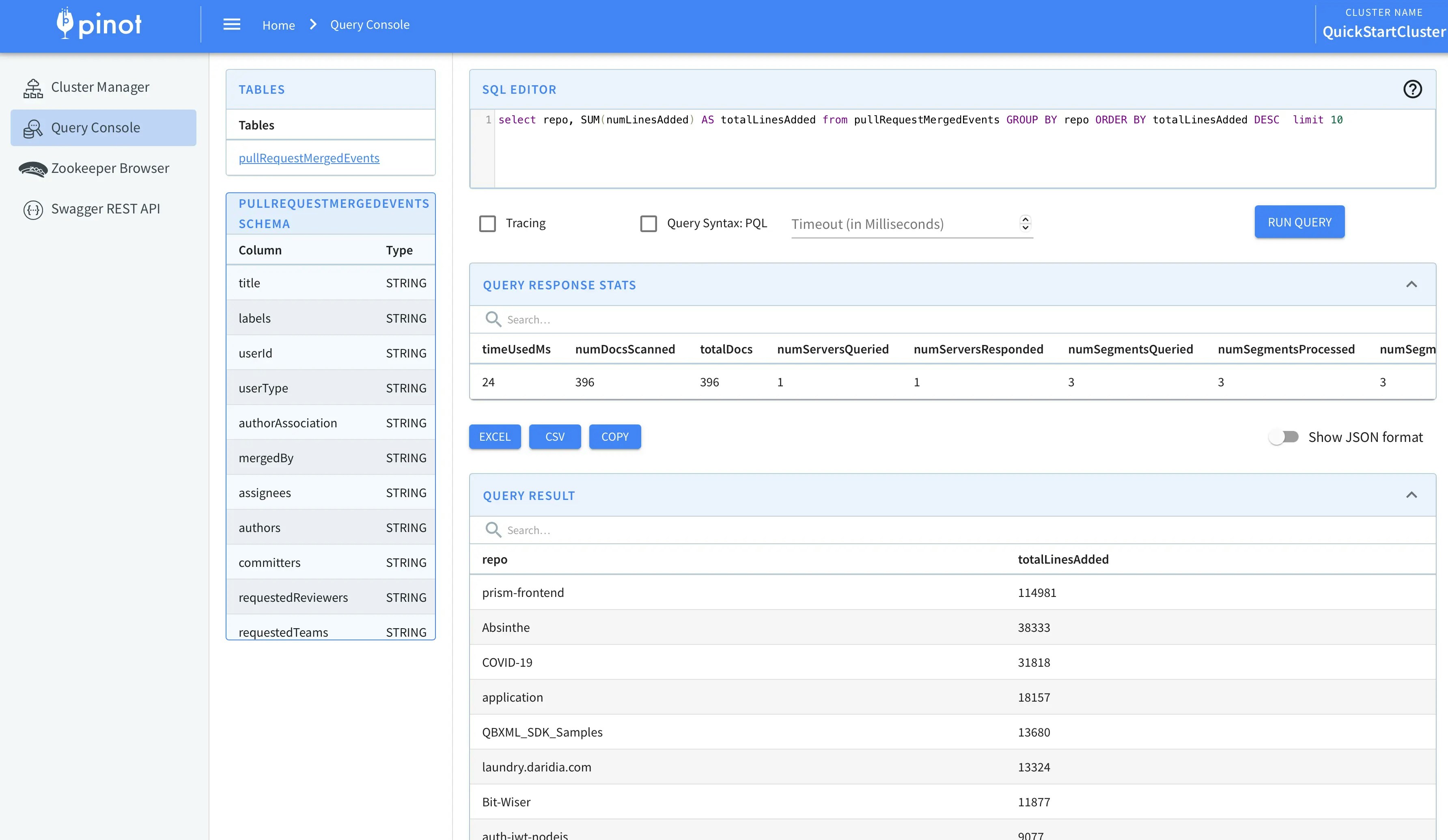
Head over to the [Query Console](http://localhost:9000/) to check the data.
 ### Visualizing Data
You can use Superset or Tableau to visualize this data.
To integrate with Superset you can check out the [Superset Integrations](https://docs.pinot.apache.org/integrations/superset) page.
You can also use our [JDBC driver](https://docs.pinot.apache.org/users/clients/jdbc) to connect Tableau to Pinot.
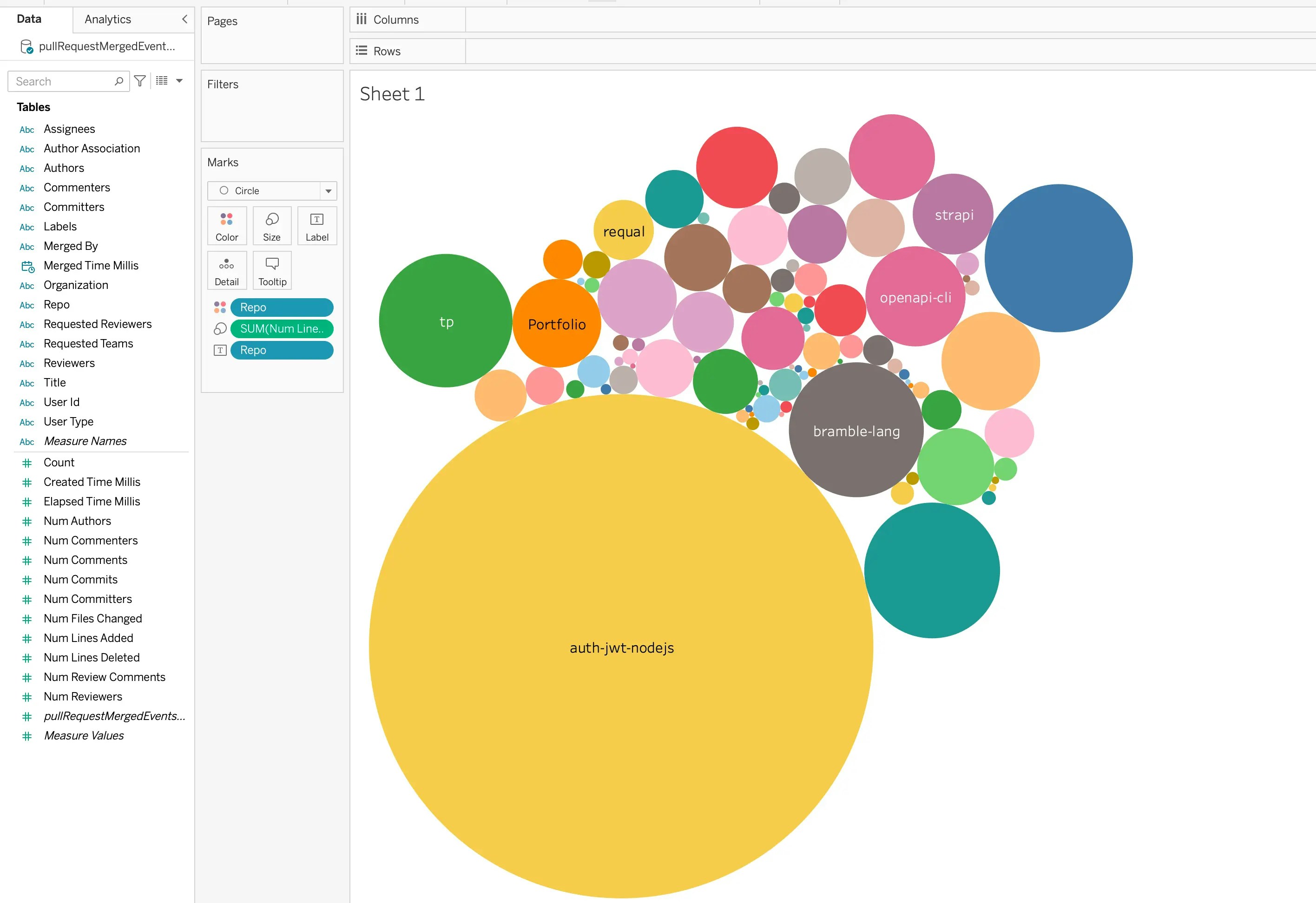
Here are some insights captured via Tableau-
#### Most Active organizations in last 1 hour
### Visualizing Data
You can use Superset or Tableau to visualize this data.
To integrate with Superset you can check out the [Superset Integrations](https://docs.pinot.apache.org/integrations/superset) page.
You can also use our [JDBC driver](https://docs.pinot.apache.org/users/clients/jdbc) to connect Tableau to Pinot.
Here are some insights captured via Tableau-
#### Most Active organizations in last 1 hour
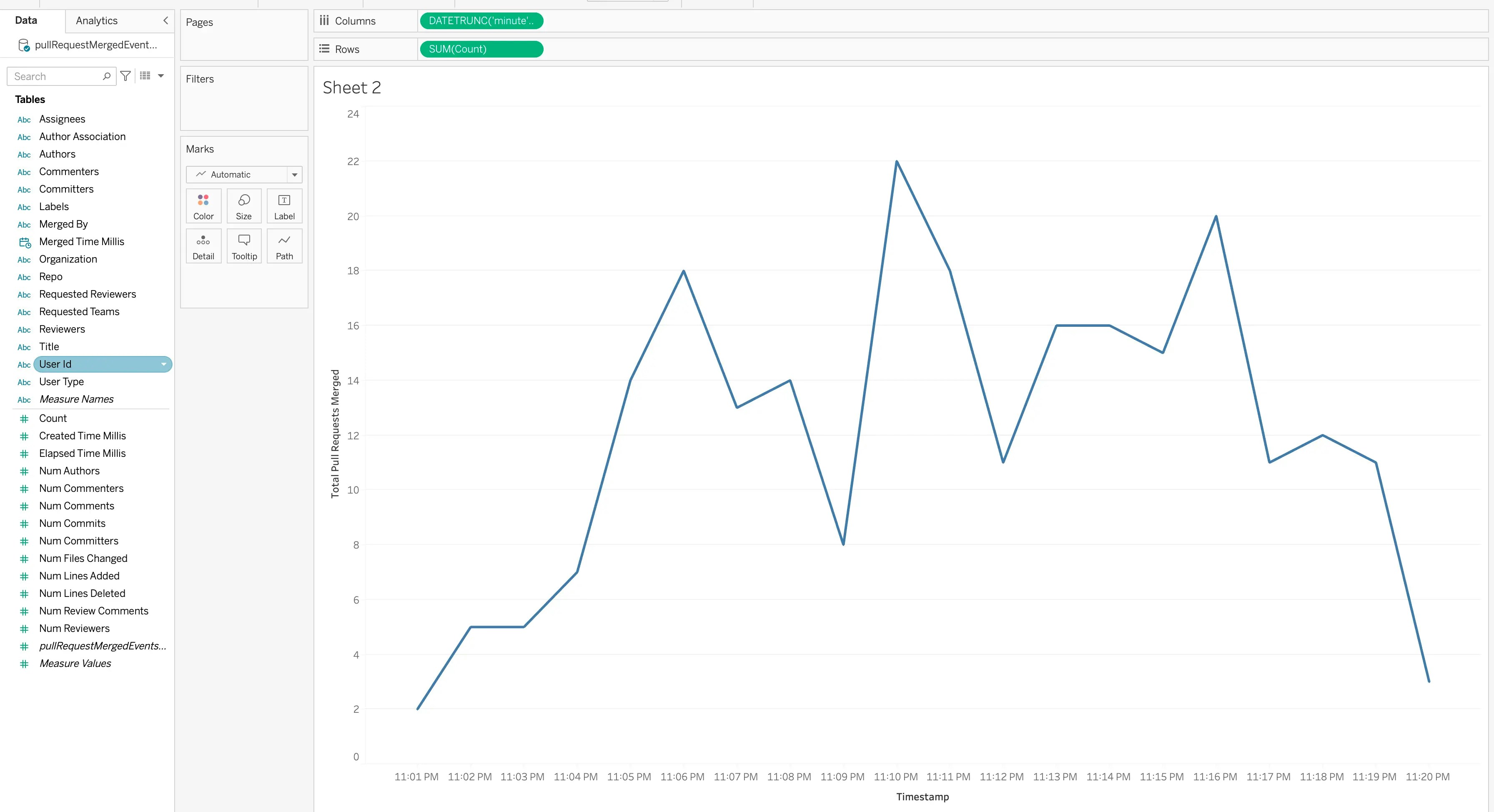
 #### Total commits happening every minute
 ## Resharding Kinesis Stream
Pinot's Kinesis plugin has been designed to handle resharding in a Kinesis stream gracefully. Pinot ensures data in parent shards is consumed before children shards.
Pinot creates segment per partition. Currently, partitions are mapped 1:1 with the shards.
We take the last index of the shardID as the partition number. e.g. `shardId-000000000000` is partition 0, `shardId-000000000001` is partition 1, `shardId-000000000002` is partition 2, and so on.
Each of the Pinot's data segment contains partition id as part of their name.
e.g. segment name `pullRequestMergedEvents__5__0__20220315T2036Z` is composed of
* tableName
* partitionId
* segmentNumber in the current partition
* current timestamp in `yyyyMMddTHHmm` format
This allows us to easily check if data from new shards after split/merge is being consumed or not.
Let's test it out in our current setup.
The segments for the stream without split look as follows
## Resharding Kinesis Stream
Pinot's Kinesis plugin has been designed to handle resharding in a Kinesis stream gracefully. Pinot ensures data in parent shards is consumed before children shards.
Pinot creates segment per partition. Currently, partitions are mapped 1:1 with the shards.
We take the last index of the shardID as the partition number. e.g. `shardId-000000000000` is partition 0, `shardId-000000000001` is partition 1, `shardId-000000000002` is partition 2, and so on.
Each of the Pinot's data segment contains partition id as part of their name.
e.g. segment name `pullRequestMergedEvents__5__0__20220315T2036Z` is composed of
* tableName
* partitionId
* segmentNumber in the current partition
* current timestamp in `yyyyMMddTHHmm` format
This allows us to easily check if data from new shards after split/merge is being consumed or not.
Let's test it out in our current setup.
The segments for the stream without split look as follows
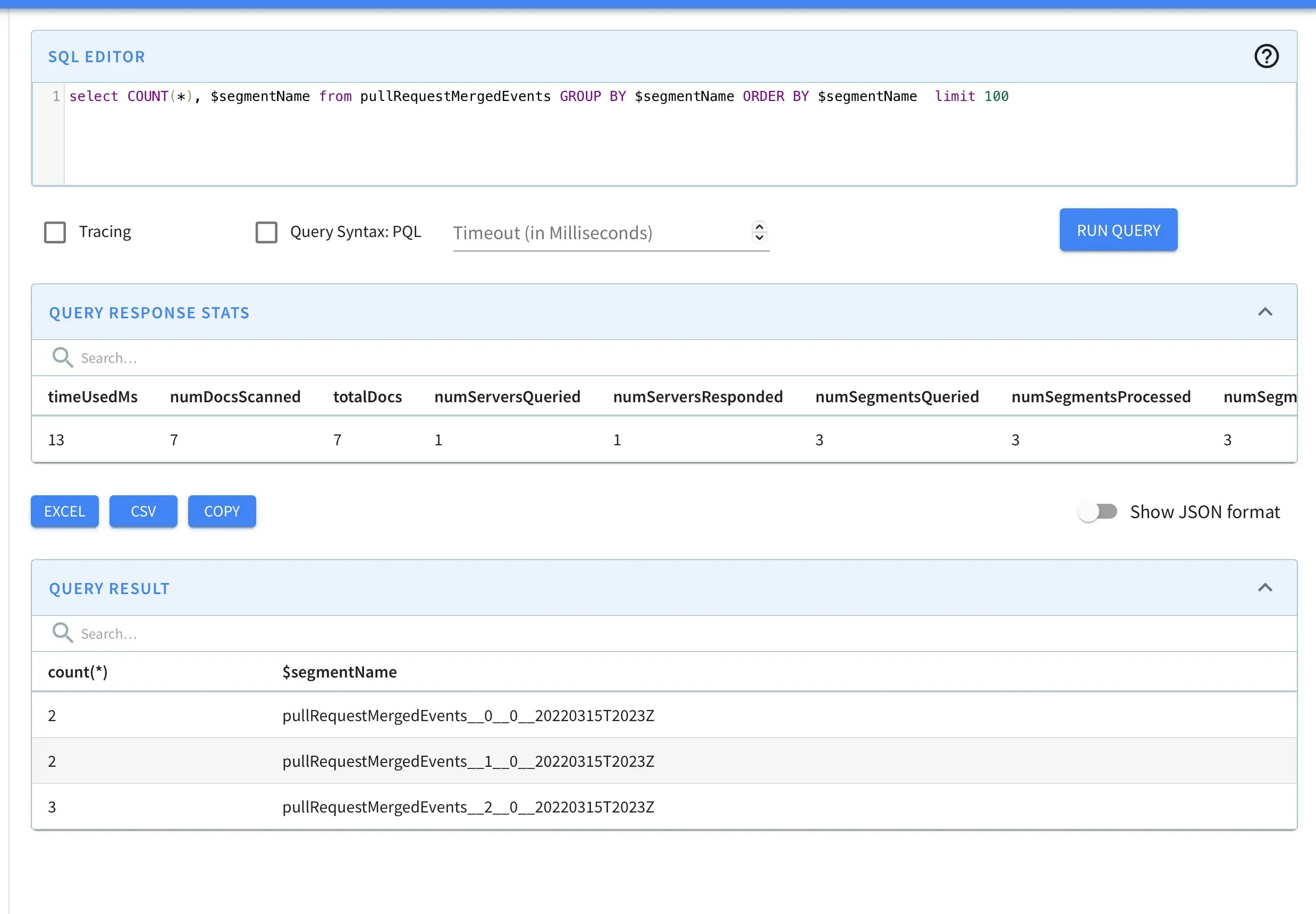 New shards are detected by `RealtimeSegmentValidationManager` which is a periodic task that runs in Controller. You can also trigger this task manually to check new segments instead of waiting for configured interval.
```bash theme={null}
curl -X GET "http://localhost:9000/periodictask/run?taskname=RealtimeSegmentValidationManager&tableName=pullRequestMergedEvents" -H "accept: application/json"
```
### Split a Shard
Let's first list out all the shards
```bash theme={null}
aws kinesis list-shards --stream-name pullRequestMergedEvents --region us-east-1
```
```json theme={null}
{
"Shards": [
{
"ShardId": "shardId-000000000000",
"HashKeyRange": {
"StartingHashKey": "0",
"EndingHashKey": "113427455640312821154458202477256070484"
},
"SequenceNumberRange": {
"StartingSequenceNumber": "49627660285068355537287018713152919383991364343226695682"
}
},
{
"ShardId": "shardId-000000000001",
"HashKeyRange": {
"StartingHashKey": "113427455640312821154458202477256070485",
"EndingHashKey": "226854911280625642308916404954512140969"
},
"SequenceNumberRange": {
"StartingSequenceNumber": "49627660285090656282485549336294455102264012704732676114"
}
},
{
"ShardId": "shardId-000000000002",
"HashKeyRange": {
"StartingHashKey": "226854911280625642308916404954512140970",
"EndingHashKey": "340282366920938463463374607431768211455"
},
"SequenceNumberRange": {
"StartingSequenceNumber": "49627660285112957027684079959435990820536661066238656546"
}
}
]
}
```
Now let's split the `shardId-000000000000` in the middle.
```bash theme={null}
aws kinesis split-shard --stream-name pullRequestMergedEvents --shard-to-split shardId-000000000000 --new-starting-hash-key 56713727820156410577229101238628035242
```
This should result in following shards. `shardId-000000000003` and `shardId-000000000004` are two new shards. Also, `shardId-000000000000` is closed now since it contains an `EndingSequenceNumber`.
```json theme={null}
{
"Shards": [
{
"ShardId": "shardId-000000000000",
"HashKeyRange": {
"StartingHashKey": "0",
"EndingHashKey": "113427455640312821154458202477256070484"
},
"SequenceNumberRange": {
"StartingSequenceNumber": "49627660285068355537287018713152919383991364343226695682",
"EndingSequenceNumber": "49627660285079505909886284024722478317308158351041888258"
}
},
{
"ShardId": "shardId-000000000001",
"HashKeyRange": {
"StartingHashKey": "113427455640312821154458202477256070485",
"EndingHashKey": "226854911280625642308916404954512140969"
},
"SequenceNumberRange": {
"StartingSequenceNumber": "49627660285090656282485549336294455102264012704732676114"
}
},
{
"ShardId": "shardId-000000000002",
"HashKeyRange": {
"StartingHashKey": "226854911280625642308916404954512140970",
"EndingHashKey": "340282366920938463463374607431768211455"
},
"SequenceNumberRange": {
"StartingSequenceNumber": "49627660285112957027684079959435990820536661066238656546"
}
},
{
"ShardId": "shardId-000000000003",
"ParentShardId": "shardId-000000000000",
"HashKeyRange": {
"StartingHashKey": "0",
"EndingHashKey": "56713727820156410577229101238628035241"
},
"SequenceNumberRange": {
"StartingSequenceNumber": "49627660724013923279965274008000462144529148390395609138"
}
},
{
"ShardId": "shardId-000000000004",
"ParentShardId": "shardId-000000000000",
"HashKeyRange": {
"StartingHashKey": "56713727820156410577229101238628035242",
"EndingHashKey": "113427455640312821154458202477256070484"
},
"SequenceNumberRange": {
"StartingSequenceNumber": "49627660724036224025163804631141997862801796751901589570"
}
}
]
}
```
Let's check if data is being consumed in Pinot from these new shards.
New shards are detected by `RealtimeSegmentValidationManager` which is a periodic task that runs in Controller. You can also trigger this task manually to check new segments instead of waiting for configured interval.
```bash theme={null}
curl -X GET "http://localhost:9000/periodictask/run?taskname=RealtimeSegmentValidationManager&tableName=pullRequestMergedEvents" -H "accept: application/json"
```
### Split a Shard
Let's first list out all the shards
```bash theme={null}
aws kinesis list-shards --stream-name pullRequestMergedEvents --region us-east-1
```
```json theme={null}
{
"Shards": [
{
"ShardId": "shardId-000000000000",
"HashKeyRange": {
"StartingHashKey": "0",
"EndingHashKey": "113427455640312821154458202477256070484"
},
"SequenceNumberRange": {
"StartingSequenceNumber": "49627660285068355537287018713152919383991364343226695682"
}
},
{
"ShardId": "shardId-000000000001",
"HashKeyRange": {
"StartingHashKey": "113427455640312821154458202477256070485",
"EndingHashKey": "226854911280625642308916404954512140969"
},
"SequenceNumberRange": {
"StartingSequenceNumber": "49627660285090656282485549336294455102264012704732676114"
}
},
{
"ShardId": "shardId-000000000002",
"HashKeyRange": {
"StartingHashKey": "226854911280625642308916404954512140970",
"EndingHashKey": "340282366920938463463374607431768211455"
},
"SequenceNumberRange": {
"StartingSequenceNumber": "49627660285112957027684079959435990820536661066238656546"
}
}
]
}
```
Now let's split the `shardId-000000000000` in the middle.
```bash theme={null}
aws kinesis split-shard --stream-name pullRequestMergedEvents --shard-to-split shardId-000000000000 --new-starting-hash-key 56713727820156410577229101238628035242
```
This should result in following shards. `shardId-000000000003` and `shardId-000000000004` are two new shards. Also, `shardId-000000000000` is closed now since it contains an `EndingSequenceNumber`.
```json theme={null}
{
"Shards": [
{
"ShardId": "shardId-000000000000",
"HashKeyRange": {
"StartingHashKey": "0",
"EndingHashKey": "113427455640312821154458202477256070484"
},
"SequenceNumberRange": {
"StartingSequenceNumber": "49627660285068355537287018713152919383991364343226695682",
"EndingSequenceNumber": "49627660285079505909886284024722478317308158351041888258"
}
},
{
"ShardId": "shardId-000000000001",
"HashKeyRange": {
"StartingHashKey": "113427455640312821154458202477256070485",
"EndingHashKey": "226854911280625642308916404954512140969"
},
"SequenceNumberRange": {
"StartingSequenceNumber": "49627660285090656282485549336294455102264012704732676114"
}
},
{
"ShardId": "shardId-000000000002",
"HashKeyRange": {
"StartingHashKey": "226854911280625642308916404954512140970",
"EndingHashKey": "340282366920938463463374607431768211455"
},
"SequenceNumberRange": {
"StartingSequenceNumber": "49627660285112957027684079959435990820536661066238656546"
}
},
{
"ShardId": "shardId-000000000003",
"ParentShardId": "shardId-000000000000",
"HashKeyRange": {
"StartingHashKey": "0",
"EndingHashKey": "56713727820156410577229101238628035241"
},
"SequenceNumberRange": {
"StartingSequenceNumber": "49627660724013923279965274008000462144529148390395609138"
}
},
{
"ShardId": "shardId-000000000004",
"ParentShardId": "shardId-000000000000",
"HashKeyRange": {
"StartingHashKey": "56713727820156410577229101238628035242",
"EndingHashKey": "113427455640312821154458202477256070484"
},
"SequenceNumberRange": {
"StartingSequenceNumber": "49627660724036224025163804631141997862801796751901589570"
}
}
]
}
```
Let's check if data is being consumed in Pinot from these new shards.
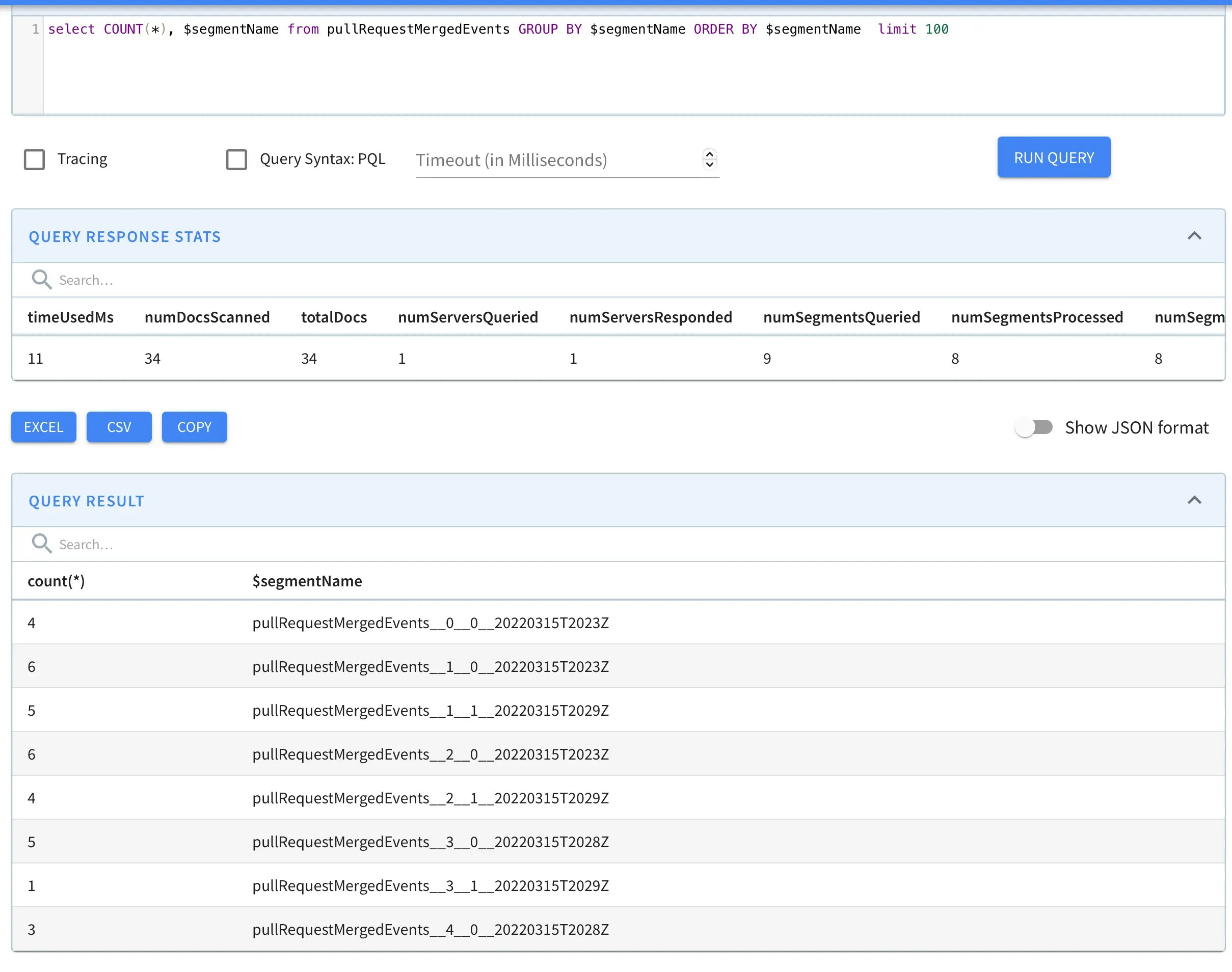 As we can see, segments with partitionIDs 3 and 4 are now visible. e.g. `pullRequestMergedEvents__3__0__20220315T2028Z` and `pullRequestMergedEvents__4__0__20220315T2028Z`
### Merge two shards
Now let's merge `shardId-000000000001` and `shardId-000000000002 `to create a new shard `shardId-000000000005`.
```bash theme={null}
aws kinesis merge-shards --stream-name pullRequestMergedEvents --shard-to-merge shardId-000000000001 --adjacent-shard-to-merge shardId-000000000002
```
New shard ids should look as follows -
```json theme={null}
{
"Shards": [
{
"ShardId": "shardId-000000000000",
"HashKeyRange": {
"StartingHashKey": "0",
"EndingHashKey": "113427455640312821154458202477256070484"
},
"SequenceNumberRange": {
"ShardId": "shardId-000000000000",
"HashKeyRange": {
"StartingHashKey": "0",
"EndingHashKey": "113427455640312821154458202477256070484"
},
"SequenceNumberRange": {
"StartingSequenceNumber": "49627660285068355537287018713152919383991364343226695682",
"EndingSequenceNumber": "49627660285079505909886284024722478317308158351041888258"
}
},
{
"ShardId": "shardId-000000000001",
"HashKeyRange": {
"StartingHashKey": "113427455640312821154458202477256070485",
"EndingHashKey": "226854911280625642308916404954512140969"
},
"SequenceNumberRange": {
"StartingSequenceNumber": "49627660285090656282485549336294455102264012704732676114",
"EndingSequenceNumber": "49627660285101806655084814647864014035580838735824027666"
}
},
{
"ShardId": "shardId-000000000002",
"HashKeyRange": {
"StartingHashKey": "226854911280625642308916404954512140970",
"EndingHashKey": "340282366920938463463374607431768211455"
},
"SequenceNumberRange": {
"StartingSequenceNumber": "49627660285112957027684079959435990820536661066238656546",
"EndingSequenceNumber": "49627660285124107400283345271005549753853487097330008098"
}
},
{
"ShardId": "shardId-000000000003",
"ParentShardId": "shardId-000000000000",
"HashKeyRange": {
"StartingHashKey": "0",
"EndingHashKey": "56713727820156410577229101238628035241"
},
"SequenceNumberRange": {
"StartingSequenceNumber": "49627660724013923279965274008000462144529148390395609138"
}
},
{
"ShardId": "shardId-000000000004",
"ParentShardId": "shardId-000000000000",
"HashKeyRange": {
"StartingHashKey": "56713727820156410577229101238628035242",
"EndingHashKey": "113427455640312821154458202477256070484"
},
"SequenceNumberRange": {
"StartingSequenceNumber": "49627660724036224025163804631141997862801796751901589570"
}
},
{
"ShardId": "shardId-000000000005",
"ParentShardId": "shardId-000000000001",
"AdjacentParentShardId": "shardId-000000000002",
"HashKeyRange": {
"StartingHashKey": "113427455640312821154458202477256070485",
"EndingHashKey": "340282366920938463463374607431768211455"
},
"SequenceNumberRange": {
"StartingSequenceNumber": "49627660890332880970606661397573849021940660525273710674"
}
}
]
```
Let's check if data is being consumed in Pinot from new shardID `shardId-000000000005`
As we can see, segments with partitionIDs 3 and 4 are now visible. e.g. `pullRequestMergedEvents__3__0__20220315T2028Z` and `pullRequestMergedEvents__4__0__20220315T2028Z`
### Merge two shards
Now let's merge `shardId-000000000001` and `shardId-000000000002 `to create a new shard `shardId-000000000005`.
```bash theme={null}
aws kinesis merge-shards --stream-name pullRequestMergedEvents --shard-to-merge shardId-000000000001 --adjacent-shard-to-merge shardId-000000000002
```
New shard ids should look as follows -
```json theme={null}
{
"Shards": [
{
"ShardId": "shardId-000000000000",
"HashKeyRange": {
"StartingHashKey": "0",
"EndingHashKey": "113427455640312821154458202477256070484"
},
"SequenceNumberRange": {
"ShardId": "shardId-000000000000",
"HashKeyRange": {
"StartingHashKey": "0",
"EndingHashKey": "113427455640312821154458202477256070484"
},
"SequenceNumberRange": {
"StartingSequenceNumber": "49627660285068355537287018713152919383991364343226695682",
"EndingSequenceNumber": "49627660285079505909886284024722478317308158351041888258"
}
},
{
"ShardId": "shardId-000000000001",
"HashKeyRange": {
"StartingHashKey": "113427455640312821154458202477256070485",
"EndingHashKey": "226854911280625642308916404954512140969"
},
"SequenceNumberRange": {
"StartingSequenceNumber": "49627660285090656282485549336294455102264012704732676114",
"EndingSequenceNumber": "49627660285101806655084814647864014035580838735824027666"
}
},
{
"ShardId": "shardId-000000000002",
"HashKeyRange": {
"StartingHashKey": "226854911280625642308916404954512140970",
"EndingHashKey": "340282366920938463463374607431768211455"
},
"SequenceNumberRange": {
"StartingSequenceNumber": "49627660285112957027684079959435990820536661066238656546",
"EndingSequenceNumber": "49627660285124107400283345271005549753853487097330008098"
}
},
{
"ShardId": "shardId-000000000003",
"ParentShardId": "shardId-000000000000",
"HashKeyRange": {
"StartingHashKey": "0",
"EndingHashKey": "56713727820156410577229101238628035241"
},
"SequenceNumberRange": {
"StartingSequenceNumber": "49627660724013923279965274008000462144529148390395609138"
}
},
{
"ShardId": "shardId-000000000004",
"ParentShardId": "shardId-000000000000",
"HashKeyRange": {
"StartingHashKey": "56713727820156410577229101238628035242",
"EndingHashKey": "113427455640312821154458202477256070484"
},
"SequenceNumberRange": {
"StartingSequenceNumber": "49627660724036224025163804631141997862801796751901589570"
}
},
{
"ShardId": "shardId-000000000005",
"ParentShardId": "shardId-000000000001",
"AdjacentParentShardId": "shardId-000000000002",
"HashKeyRange": {
"StartingHashKey": "113427455640312821154458202477256070485",
"EndingHashKey": "340282366920938463463374607431768211455"
},
"SequenceNumberRange": {
"StartingSequenceNumber": "49627660890332880970606661397573849021940660525273710674"
}
}
]
```
Let's check if data is being consumed in Pinot from new shardID `shardId-000000000005`
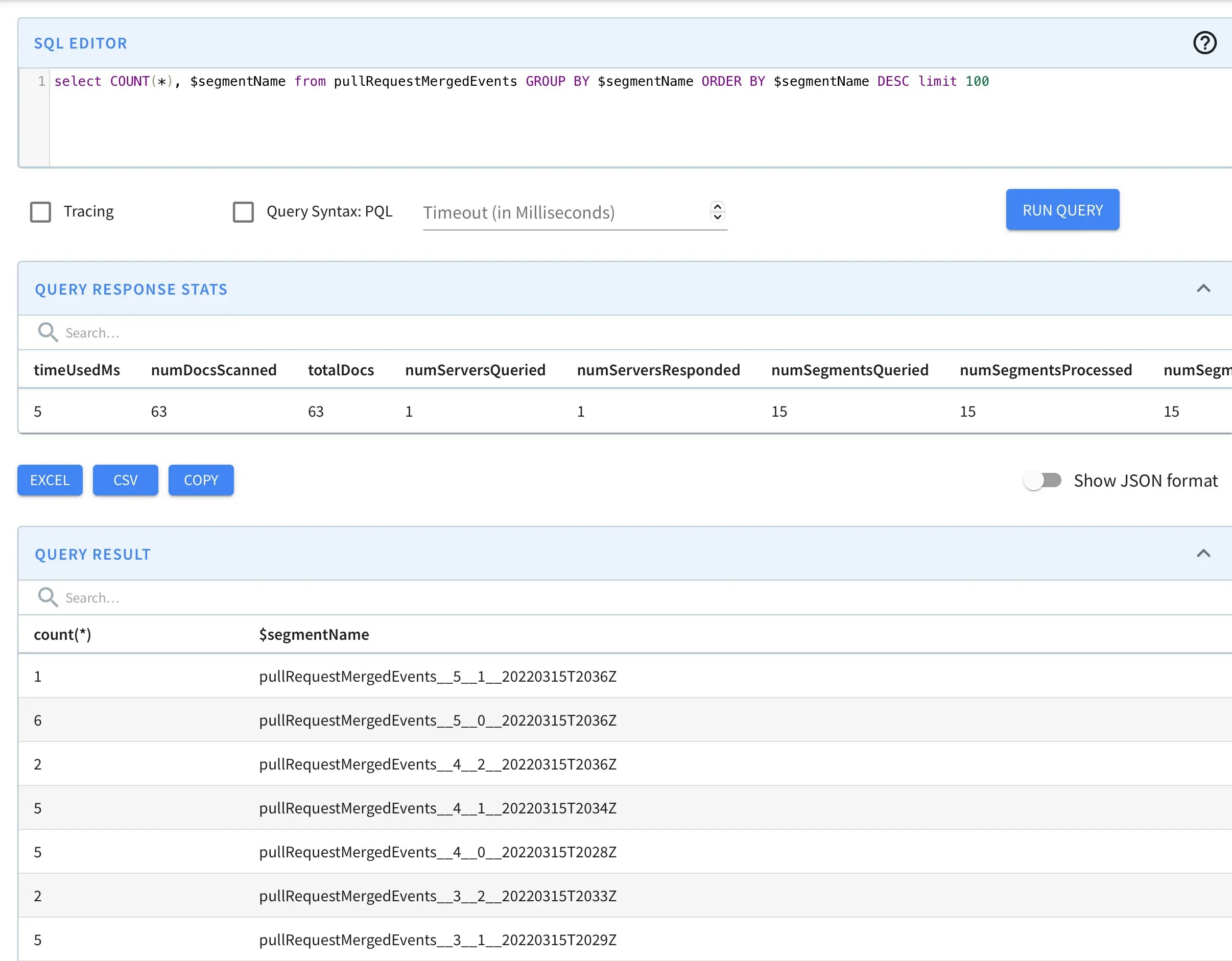 As we can see, segments with partitionID 5 such as `pullRequestMergedEvents__5__1__20220315T2036Z` are now visible.