> ## Documentation Index
> Fetch the complete documentation index at: https://docs.startree.ai/llms.txt
> Use this file to discover all available pages before exploring further.
# Using the Pinot Proxy
> Use the Pinot Proxy to route queries to the right broker tenant and access advanced query, cursor, routing, and debug APIs.
## Proxy URL
Use the StarTree Pinot Proxy URL in place of the broker URL:
```text theme={null}
https://proxy.broker.XXXX.startree.cloud/
```
where `broker.XXXX` is your regular broker host.
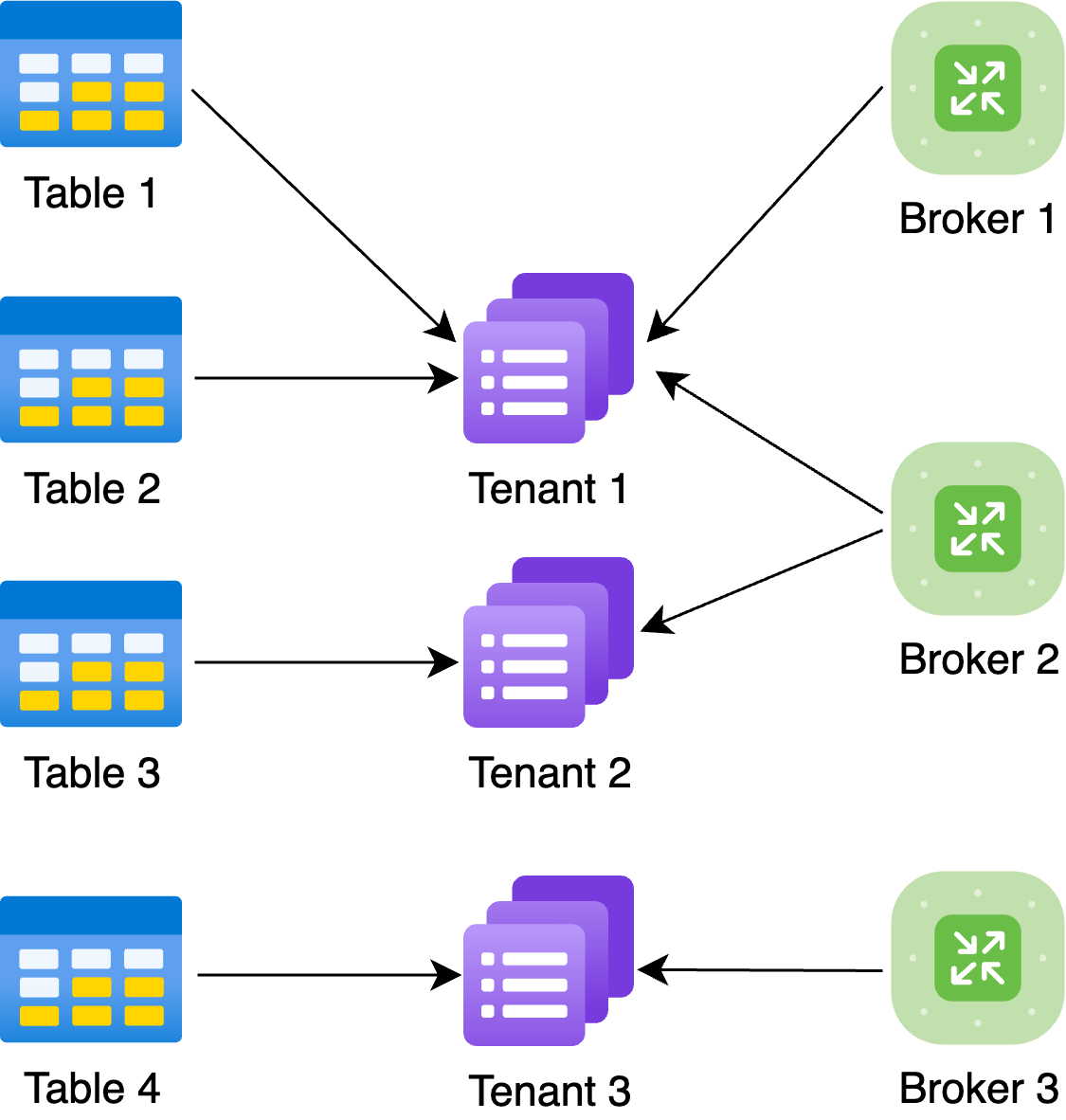
The Pinot Proxy routes query requests to brokers while preserving broker-tenant isolation. A table can be mapped to one broker tenant, multiple tables can share a broker tenant, and one broker can serve multiple tenants.
 ## Request Routing
The proxy routes a query to a broker only when that broker can serve every table used by the query. If a multi-table query references tables that are not served by one common broker, the query fails.
In the diagram above:
* A `Table 1 JOIN Table 2` query can route to **Broker 1** or **Broker 2**.
* A `Table 1 JOIN Table 3` query can route only to **Broker 2**.
* A `Table 1 JOIN Table 4` query cannot be routed.
By default, the proxy parses the SQL query to determine the referenced tables. To avoid that parsing overhead, pass table names with the `FORWARD_TABLE` header.
* For multi-table queries, pass one `FORWARD_TABLE` header per table.
* If you use databases, use `.
## Request Routing
The proxy routes a query to a broker only when that broker can serve every table used by the query. If a multi-table query references tables that are not served by one common broker, the query fails.
In the diagram above:
* A `Table 1 JOIN Table 2` query can route to **Broker 1** or **Broker 2**.
* A `Table 1 JOIN Table 3` query can route only to **Broker 2**.
* A `Table 1 JOIN Table 4` query cannot be routed.
By default, the proxy parses the SQL query to determine the referenced tables. To avoid that parsing overhead, pass table names with the `FORWARD_TABLE` header.
* For multi-table queries, pass one `FORWARD_TABLE` header per table.
* If you use databases, use `.`.
* Do not include the `_OFFLINE` or `_REALTIME` suffix unless the endpoint explicitly asks for a typed table name.
* Keep the headers consistent with the SQL. The proxy trusts the headers for routing, so an incorrect header can route to a broker that cannot serve the query.
### Header-Routed Query
```bash theme={null}
curl "$PROXY_URL/query/sql" \
-H "Authorization: Bearer $TOKEN" \
-H "FORWARD_TABLE: orders" \
-H "FORWARD_TABLE: customers" \
-H "Content-Type: application/json" \
--data @- <<'JSON'
{
"sql": "SET useMultistageEngine=true; SELECT count(*) FROM orders JOIN customers ON orders.customerId = customers.customerId"
}
JSON
```
To confirm a query is using the headers, intentionally pass a mismatched table in a non-production environment. The request should fail when the selected broker cannot serve the SQL table.
## Query Endpoints
Use these endpoints for normal query execution through the proxy:
| Method | Path | Use |
| ------ | -------------------- | ------------------------------------------------------------------------ |
| `POST` | `/query/sql` | Standard Pinot SQL query endpoint. |
| `GET` | `/query/sql?sql=...` | GET form of the standard SQL endpoint. |
| `POST` | `/sql` | Controller-compatible alias for `/query/sql`. |
| `GET` | `/sql?sql=...` | GET form of the controller-compatible SQL alias. |
| `POST` | `/query` | Broker query endpoint that uses the multi-stage query engine by default. |
| `POST` | `/dal/sql` | Data access layer endpoint with optional engine selection. |
### Standard SQL
```bash theme={null}
curl "$PROXY_URL/query/sql" \
-H "Authorization: Bearer $TOKEN" \
-H "Content-Type: application/json" \
--data '{"sql":"SELECT orderStatus, count(*) FROM orders GROUP BY orderStatus LIMIT 10"}'
```
### Multi-Stage Query Endpoint
```bash theme={null}
curl "$PROXY_URL/query" \
-H "Authorization: Bearer $TOKEN" \
-H "Content-Type: application/json" \
--data '{"sql":"SELECT customerId, count(*) FROM orders GROUP BY customerId LIMIT 10"}'
```
### Data Access Layer Query
```bash theme={null}
curl "$PROXY_URL/dal/sql" \
-H "Authorization: Bearer $TOKEN" \
-H "Content-Type: application/json" \
--data '{"sql":"SELECT count(*) FROM orders","engine":"PINOT"}'
```
## Paginated Query Results
For large result sets, enable proxy pagination on `POST /query/sql` by adding `doPaginate=true`. The proxy forwards the request to the broker's StarTree pagination namespace and returns a `requestId` that can be used to fetch result pages.
```bash theme={null}
curl "$PROXY_URL/query/sql?doPaginate=true&numRows=1000" \
-H "Authorization: Bearer $TOKEN" \
-H "Content-Type: application/json" \
--data '{"sql":"SELECT * FROM orders ORDER BY orderDate DESC"}'
```
Fetch result pages with the returned request ID:
```bash theme={null}
curl "$PROXY_URL/query/$REQUEST_ID/results?offset=0&numRows=1000" \
-H "Authorization: Bearer $TOKEN"
```
Read metadata for the paginated query:
```bash theme={null}
curl "$PROXY_URL/query/$REQUEST_ID/metadata" \
-H "Authorization: Bearer $TOKEN"
```
List and clean stored paginated results:
```bash theme={null}
curl "$PROXY_URL/query/resultStore" \
-H "Authorization: Bearer $TOKEN"
curl -X DELETE "$PROXY_URL/query/resultStore/$REQUEST_ID" \
-H "Authorization: Bearer $TOKEN"
```
The `/query/{requestId}/results`, `/query/{requestId}/metadata`, and `/query/resultStore` proxy endpoints forward to the older StarTree pagination namespace and are marked deprecated in the proxy implementation. Prefer cursor response-store APIs for new integrations when available in your environment.
## Cursor Response Store
The proxy also forwards Pinot cursor response-store APIs.
| Method | Path | Use |
| -------- | ---------------------------------------------------------- | ----------------------------------------------- |
| `GET` | `/responseStore` | List response-store metadata. |
| `GET` | `/responseStore/{requestId}` | Get response metadata without the result table. |
| `GET` | `/responseStore/{requestId}/results?offset=0&numRows=1000` | Fetch a result page. |
| `DELETE` | `/responseStore/{requestId}` | Delete one response store. |
| `DELETE` | `/responseStore?expiredBefore=` | Delete expired response stores. |
Example:
```bash theme={null}
curl "$PROXY_URL/responseStore/$REQUEST_ID/results?offset=0&numRows=1000" \
-H "Authorization: Bearer $TOKEN"
```
Deleting response stores requires cluster-level authorization for response-store deletion.
## Routing And Debug APIs
Use routing and debug endpoints only for validation, incident response, or with StarTree support guidance. They expose broker routing state and can change routing state when using `PUT` or `DELETE`.
| Method | Path | Use |
| -------- | ---------------------------------------------------- | ----------------------------------------------- |
| `GET` | `/debug/timeBoundary/{tableName}` | Inspect hybrid table time-boundary information. |
| `GET` | `/debug/routingTable/{tableName}` | Inspect routing for a typed or untyped table. |
| `GET` | `/debug/routingTable?pql=...` | Inspect routing for a PQL query. |
| `GET` | `/debug/routingTable/sql?query=...` | Inspect routing for a SQL query. |
| `PUT` | `/routing/{tableNameWithType}` | Build or rebuild routing for a table. |
| `PUT` | `/routing/refresh/{tableNameWithType}/{segmentName}` | Refresh routing for one segment. |
| `DELETE` | `/routing/{tableNameWithType}` | Remove routing for a table. |
Examples:
```bash theme={null}
curl "$PROXY_URL/debug/timeBoundary/orders" \
-H "Authorization: Bearer $TOKEN"
curl --get "$PROXY_URL/debug/routingTable/sql" \
-H "Authorization: Bearer $TOKEN" \
--data-urlencode "query=SELECT * FROM orders_OFFLINE WHERE orderDate >= '2026-01-01' LIMIT 10"
```
Typed table names and segment names in path parameters must be URL encoded when they contain characters that are not path-safe.
## Health And Controller Pass-Through
Check proxy health with:
```bash theme={null}
curl "$PROXY_URL/health"
```
Requests that do not match a proxy-specific broker/query route are forwarded to the controller. This lets controller APIs continue to work through the proxy, but query clients should prefer the explicit query endpoints listed above.
## Usage Considerations
* Use `FORWARD_TABLE` headers for high-throughput applications to avoid repeated SQL parsing at the proxy.
* Pass every table used by a join as a separate `FORWARD_TABLE` header.
* Keep customer applications on `/query/sql`, `/query`, or cursor endpoints. Reserve debug and routing mutation APIs for operational workflows.
* When using databases, include the database-qualified table name in `FORWARD_TABLE`.
* Use typed table names such as `orders_OFFLINE` only for APIs that explicitly ask for a table name with type.