> ## Documentation Index
> Fetch the complete documentation index at: https://docs.startree.ai/llms.txt
> Use this file to discover all available pages before exploring further.
# Hybrid Tables
## Overview
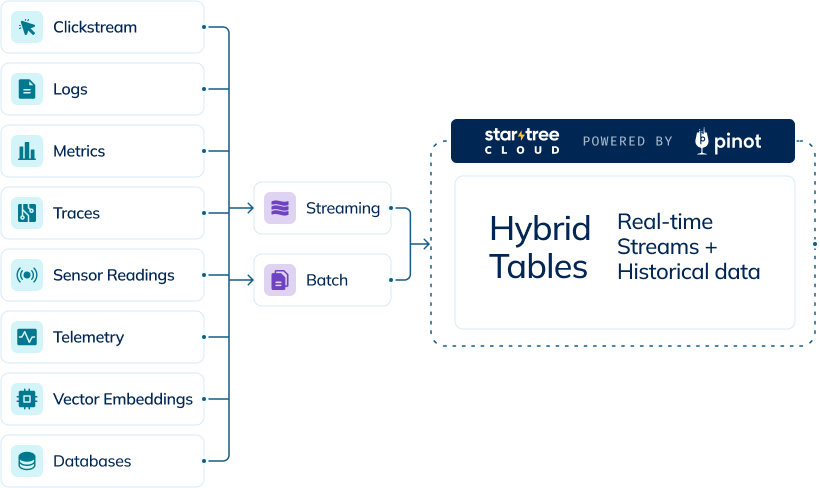
Hybrid tables in StarTree Cloud combine the benefits of both real-time and offline ingestion in a single logical table. This powerful configuration allows you to query across both streaming and batch data seamlessly, without having to specify which data source you're accessing.
 ## How Hybrid Tables Work
A hybrid table consists of two physical tables that share the same name:
* A real-time table ingesting data from streaming sources (e.g., Kafka)
* An offline table containing historical data loaded from batch sources
The query broker intelligently routes queries to the appropriate segments based on time boundaries, providing a unified view of your data. When an offline segment is pushed to cover a time period that overlaps with real-time data, the broker automatically prioritizes the offline segments for that period.
## Key Benefits
* **Complete Data View**: Access both real-time and historical data through a single table
* **Optimized Storage**: Keep long-term historical data in offline segments while maintaining a shorter retention for real-time data
* **Data Correction**: Replace real-time data with corrected/deduplicated offline data as it becomes available
* **Seamless Querying**: Users query a single table without needing to understand the underlying table types
## Common Use Cases
* Daily ETL processes that push cleaned, deduplicated data to offline segments while continuously ingesting real-time data
* Maintaining years of historical data in offline segments while keeping only recent data in real-time segments
* Providing immediate visibility into streaming data while ensuring consistency with batch-processed data
## Configuration
Hybrid tables must be configured using Controller APIs. A typical configuration involves:
1. Creating both real-time and offline table configurations
2. Setting appropriate retention periods for each (longer for offline, shorter for real-time)
3. Configuring time boundaries to manage query routing
## Managed Offline Flow
StarTree Cloud offers a "Managed Offline Flow" that can automatically move data from real-time to offline segments, read more about it [here](/corecapabilities/manage-data/segment-import-task).
Hybrid tables configuration requires using Controller APIs as this setup is not yet available through the Data Portal interface. For detailed configuration instructions and examples, refer [here](https://docs.pinot.apache.org/basics/concepts/components/table)
## How Hybrid Tables Work
A hybrid table consists of two physical tables that share the same name:
* A real-time table ingesting data from streaming sources (e.g., Kafka)
* An offline table containing historical data loaded from batch sources
The query broker intelligently routes queries to the appropriate segments based on time boundaries, providing a unified view of your data. When an offline segment is pushed to cover a time period that overlaps with real-time data, the broker automatically prioritizes the offline segments for that period.
## Key Benefits
* **Complete Data View**: Access both real-time and historical data through a single table
* **Optimized Storage**: Keep long-term historical data in offline segments while maintaining a shorter retention for real-time data
* **Data Correction**: Replace real-time data with corrected/deduplicated offline data as it becomes available
* **Seamless Querying**: Users query a single table without needing to understand the underlying table types
## Common Use Cases
* Daily ETL processes that push cleaned, deduplicated data to offline segments while continuously ingesting real-time data
* Maintaining years of historical data in offline segments while keeping only recent data in real-time segments
* Providing immediate visibility into streaming data while ensuring consistency with batch-processed data
## Configuration
Hybrid tables must be configured using Controller APIs. A typical configuration involves:
1. Creating both real-time and offline table configurations
2. Setting appropriate retention periods for each (longer for offline, shorter for real-time)
3. Configuring time boundaries to manage query routing
## Managed Offline Flow
StarTree Cloud offers a "Managed Offline Flow" that can automatically move data from real-time to offline segments, read more about it [here](/corecapabilities/manage-data/segment-import-task).
Hybrid tables configuration requires using Controller APIs as this setup is not yet available through the Data Portal interface. For detailed configuration instructions and examples, refer [here](https://docs.pinot.apache.org/basics/concepts/components/table)