> ## Documentation Index
> Fetch the complete documentation index at: https://docs.startree.ai/llms.txt
> Use this file to discover all available pages before exploring further.
# Ingest Data
> Ingest data from various streaming and batch sources using connectors. The StarTree Data Portal makes it easy to ingest and transform data.
## Overview
StarTree Cloud provides a streamlined approach to data ingestion, eliminating the need to build complex ingestion architecture before using your data. The platform delivers pre-built, scalable ingestion mechanisms that seamlessly connect to your data sources, supporting petabyte-scale analytics with minimal setup.
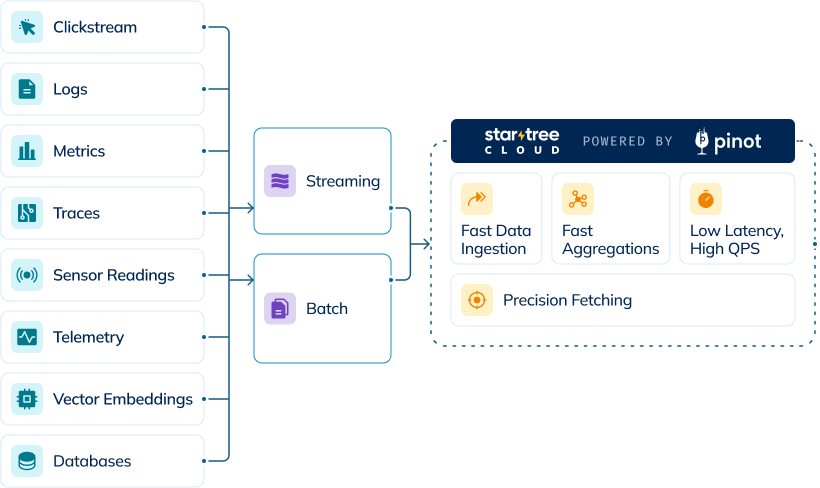 Key ingestion capabilities include:
* Real-time streaming with sub-second latency
* Scalable batch processing for large historical datasets
* Built-in connectors for popular data sources
* Automatic schema detection and optimization
* Support for custom transformations during ingestion
## Ingestion Types
### Real-Time Ingestion
StarTree Cloud enables streaming data ingestion from sources like Kafka, allowing you to query data within seconds of it being generated. This capability supports use cases requiring immediate insights, such as dashboards, monitoring, and real-time analytics.
### Batch Ingestion
For historical or large datasets stored in file systems like S3 or cloud data warehouses, StarTree Cloud provides efficient batch ingestion. This approach is optimized for loading large volumes of data while maintaining query performance.
StarTree Cloud also supports hybrid tables, which combine both real-time and batch data into a single table view. This configuration provides the benefits of both ingestion methods - real-time data access plus historical data completeness. Hybrid tables must be configured using Controller APIs. For detailed instructions, please refer to the [Hybrid Tables](/corecapabilities/manage-data/hybrid-tables) documentation.
## Table Creation Flow
Creating a table in StarTree Cloud involves the following key steps, they can be seamlessly done using [Data Portal](/corecapabilities/ingestdata/ingest_data_overview#data-portal) or using the [Controller APIs](/api-reference/table/add-the-tableconfigs-using-the-tableconfigsstr-json).
Key ingestion capabilities include:
* Real-time streaming with sub-second latency
* Scalable batch processing for large historical datasets
* Built-in connectors for popular data sources
* Automatic schema detection and optimization
* Support for custom transformations during ingestion
## Ingestion Types
### Real-Time Ingestion
StarTree Cloud enables streaming data ingestion from sources like Kafka, allowing you to query data within seconds of it being generated. This capability supports use cases requiring immediate insights, such as dashboards, monitoring, and real-time analytics.
### Batch Ingestion
For historical or large datasets stored in file systems like S3 or cloud data warehouses, StarTree Cloud provides efficient batch ingestion. This approach is optimized for loading large volumes of data while maintaining query performance.
StarTree Cloud also supports hybrid tables, which combine both real-time and batch data into a single table view. This configuration provides the benefits of both ingestion methods - real-time data access plus historical data completeness. Hybrid tables must be configured using Controller APIs. For detailed instructions, please refer to the [Hybrid Tables](/corecapabilities/manage-data/hybrid-tables) documentation.
## Table Creation Flow
Creating a table in StarTree Cloud involves the following key steps, they can be seamlessly done using [Data Portal](/corecapabilities/ingestdata/ingest_data_overview#data-portal) or using the [Controller APIs](/api-reference/table/add-the-tableconfigs-using-the-tableconfigsstr-json).
 * Create a reusable connection to your data source (S3, Kafka, Confluent, etc.)
* Test the connection to ensure it works properly
* Specify which topic or folders to ingest from
* Preview sample data to verify correct source selection
* Review and edit schema details
* Adjust column properties to ensure correct data formats
* Configure any needed preload transformations
* Verify proper column type identification
* Preview updated sample data with applied changes
* Specify table type and time column for partitioning
* Configure real-time data update handling through upserts
* Define primary key for deduplication if needed
* Apply additional configurations like indexing
* Review final table configuration and schema
* Create the table once all settings are confirmed
## Data Portal
The StarTree Data Portal makes it easy to ingest data into Pinot tables stored in StarTree Cloud. The Data Portal has a visual interface, which lets you ingest data from a variety of streaming and batch sources. Perform various transformations with minimal complexity, minimizing potential errors. Save time by catching issues like data format incompatibility, poor data quality, and connectivity issues.
The Data Portal automatically generates certain indexes based on the Pinot schema and data characteristics which are done transparently to the user. You can tune certain column indexes or add new indexes such as StarTree (which enables users to generate highly optimized materialized views), to suit your specific use case.
Connect to your data sources quickly using our growing library of pre-built connectors.
## Streaming Sources
} href="/corecapabilities/ingestdata/dataportal/streaming/kafka">
Stream real-time events using Apache Kafka
} href="/corecapabilities/ingestdata/dataportal/streaming/kinesis">
Ingest real-time data from Amazon Kinesis
} href="/corecapabilities/ingestdata/dataportal/streaming/confluent">
Ingest from fully managed Kafka in Confluent Cloud
} href="/corecapabilities/ingestdata/dataportal/streaming/redpanda">
High-performance streaming ingestion with Redpanda
} href="/corecapabilities/ingestdata/dataportal/streaming/aiven">
Connect to the managed Kafka service by Aiven
} href="/corecapabilities/ingestdata/dataportal/streaming/warpstream">
Stream data using WarpStream's Kafka-compatible API
## Batch Sources
} href="/corecapabilities/ingestdata/dataportal/batch/s3">
Batch ingest files stored in Amazon S3 buckets
} href="/corecapabilities/ingestdata/dataportal/batch/snowflake">
Load batch data from Snowflake into StarTree Cloud
} href="/corecapabilities/ingestdata/dataportal/batch/bigquery">
Load data from Google BigQuery tables and views
} href="/corecapabilities/ingestdata/dataportal/batch/gcs">
Batch ingest files from Google Cloud Storage
} href="/corecapabilities/ingestdata/dataportal/batch/adls">
Batch ingest files from Azure Data Lake Storage
* Create a reusable connection to your data source (S3, Kafka, Confluent, etc.)
* Test the connection to ensure it works properly
* Specify which topic or folders to ingest from
* Preview sample data to verify correct source selection
* Review and edit schema details
* Adjust column properties to ensure correct data formats
* Configure any needed preload transformations
* Verify proper column type identification
* Preview updated sample data with applied changes
* Specify table type and time column for partitioning
* Configure real-time data update handling through upserts
* Define primary key for deduplication if needed
* Apply additional configurations like indexing
* Review final table configuration and schema
* Create the table once all settings are confirmed
## Data Portal
The StarTree Data Portal makes it easy to ingest data into Pinot tables stored in StarTree Cloud. The Data Portal has a visual interface, which lets you ingest data from a variety of streaming and batch sources. Perform various transformations with minimal complexity, minimizing potential errors. Save time by catching issues like data format incompatibility, poor data quality, and connectivity issues.
The Data Portal automatically generates certain indexes based on the Pinot schema and data characteristics which are done transparently to the user. You can tune certain column indexes or add new indexes such as StarTree (which enables users to generate highly optimized materialized views), to suit your specific use case.
Connect to your data sources quickly using our growing library of pre-built connectors.
## Streaming Sources
} href="/corecapabilities/ingestdata/dataportal/streaming/kafka">
Stream real-time events using Apache Kafka
} href="/corecapabilities/ingestdata/dataportal/streaming/kinesis">
Ingest real-time data from Amazon Kinesis
} href="/corecapabilities/ingestdata/dataportal/streaming/confluent">
Ingest from fully managed Kafka in Confluent Cloud
} href="/corecapabilities/ingestdata/dataportal/streaming/redpanda">
High-performance streaming ingestion with Redpanda
} href="/corecapabilities/ingestdata/dataportal/streaming/aiven">
Connect to the managed Kafka service by Aiven
} href="/corecapabilities/ingestdata/dataportal/streaming/warpstream">
Stream data using WarpStream's Kafka-compatible API
## Batch Sources
} href="/corecapabilities/ingestdata/dataportal/batch/s3">
Batch ingest files stored in Amazon S3 buckets
} href="/corecapabilities/ingestdata/dataportal/batch/snowflake">
Load batch data from Snowflake into StarTree Cloud
} href="/corecapabilities/ingestdata/dataportal/batch/bigquery">
Load data from Google BigQuery tables and views
} href="/corecapabilities/ingestdata/dataportal/batch/gcs">
Batch ingest files from Google Cloud Storage
} href="/corecapabilities/ingestdata/dataportal/batch/adls">
Batch ingest files from Azure Data Lake Storage