> ## Documentation Index
> Fetch the complete documentation index at: https://docs.startree.ai/llms.txt
> Use this file to discover all available pages before exploring further.
# Overview
> Data modeling helps you organize and structure the data fetched from the data source into Pinot tables. Use the Data Portal to customize your columns, transform your data, and add or remove columns.
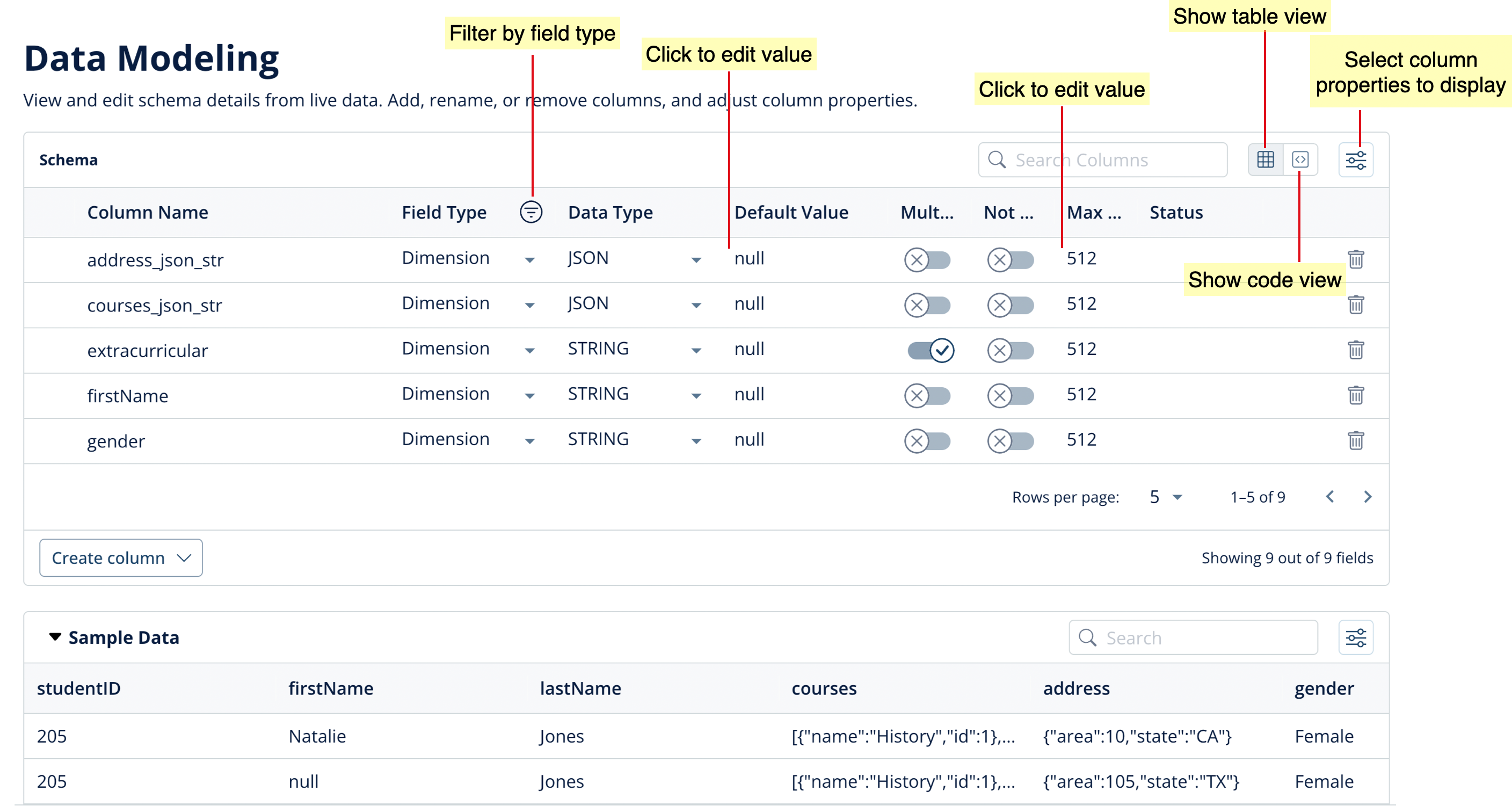
The Data Portal provides a UI-based method to customize columns and to transform data.
 ## Column operations
### **Adding a column**
1. Click **Create column**.
2. Select the type: **Dimension**, **Metric**, or **Datetime**.
3. Specify the **New Column Name**.
4. Select a **Data Type** from the drop-down list.
5. Specify the **Max Length**.
6. Enter a **Default Value**.
7. *For Dimension columns:* To allow for multiple values, click the **Multi Value** toggle button.
8. *For Datetime columns:* Select the **Datetime Format** and specify the **Datetime Format Value**.
9. Specify the **Transformation** function to be applied when deriving the new column.
10. Click **Fetch sample data** to check if the data returned is as expected.
11. Click **Create column**.
### Customizing a column
You can customize columns by changing any of the column properties.
* To change the **Field Type** or **Data Type**, select from the drop-down lists.
* To change the **Default Value** or **Max Length**, click on the value to update it.
* To enable multiple values or to specify a mandatory column, click the toggle buttons for **Multi Value** and **Not Null**.
### Deleting a column
To remove a column from the schema, click the 'trash' icon alongside the row for that column.
For more information and examples for data modeling operations, see [Data Modeling Examples](/corecapabilities/ingestdata/dataportal/data-modeling/concepts). After completing Data Modeling, proceed to [Additional Configurations](/corecapabilities/ingestdata/dataportal/additional-config-create-table).
## Column operations
### **Adding a column**
1. Click **Create column**.
2. Select the type: **Dimension**, **Metric**, or **Datetime**.
3. Specify the **New Column Name**.
4. Select a **Data Type** from the drop-down list.
5. Specify the **Max Length**.
6. Enter a **Default Value**.
7. *For Dimension columns:* To allow for multiple values, click the **Multi Value** toggle button.
8. *For Datetime columns:* Select the **Datetime Format** and specify the **Datetime Format Value**.
9. Specify the **Transformation** function to be applied when deriving the new column.
10. Click **Fetch sample data** to check if the data returned is as expected.
11. Click **Create column**.
### Customizing a column
You can customize columns by changing any of the column properties.
* To change the **Field Type** or **Data Type**, select from the drop-down lists.
* To change the **Default Value** or **Max Length**, click on the value to update it.
* To enable multiple values or to specify a mandatory column, click the toggle buttons for **Multi Value** and **Not Null**.
### Deleting a column
To remove a column from the schema, click the 'trash' icon alongside the row for that column.
For more information and examples for data modeling operations, see [Data Modeling Examples](/corecapabilities/ingestdata/dataportal/data-modeling/concepts). After completing Data Modeling, proceed to [Additional Configurations](/corecapabilities/ingestdata/dataportal/additional-config-create-table).